

By suktech24, written on Sat 7 Sep 2024, Estimated reading time : 12 – 15 mins
On Sep 4 2024, I attended two workshops at Kubernetes Community Day, Sydney. These sessions focused on crucial aspects of modern cloud-native development: Kubernetes security and GitOps implementation. In this post, I’ll share learning summary from each workshops, key takeaways and insights from Day 1 Workshops that could benefit those who couldn’t attend.
Two workshops I have attended were :
- Mastering Kubernetes Security: A Hands-On Workshop hosted by Sysdig
- Workshop repo link : https://github.com/jasonumiker-sysdig/sysdig-aws-workshop-instructions/tree/KCD
- GitOps with Argo CD and Rollouts Training & Certification, hosted by Codefresh
1. Mastering Kubernetes Security Workshop
All AWS environment were already setup for attendees. Pre-requisites for this workshop is to have a basic knowledge of Kubernetes and networking. There were five modules covered in the workshop.
- Module 1 – Runtime Threat Detection and Prevention (Workload/Kubernetes)
- Module 2 – Host and Container Vulnerability Management
- Module 3 – Kubernetes Posture/Compliance (i.e. fixing misconfigurations)
- Module 4 – Risks and Attack Path
- Module 5 – Kubernetes native firewall (NetworkPolicies)
The modules instructions are well written and was easy follow.
New Concepts I have learned
- Cloud Native
- Cloud native is an approach that uses technologies such as containers, Kubernetes, immutable infrastructure, and microservices to develop scalable applications that are built to run in the cloud.
- Cloud-native technologies are designed from the ground up to take advantage of the unique characteristics of cloud technologies, such as scalability, elasticity, and agility.
- Essential elements of a cloud-native architecture
- Conatiners : It is containerized. Each part (applications, processes, etc.) is packaged in its own container. This facilitates reproducibility, transparency, and resource isolation.
- Orchestrators : It is dynamically managed. Containers are actively orchestrated to optimize resource utilization.Container orchestrators direct how and where containers run, fix any that go down, and determine if more are needed.
- Microservices-oriented: Applications are segmented into microservices, which significantly increases their overall agility and maintainability.
- Cloud Infrastructure Entitlement Management (CIEM)
- Cloud infrastructure entitlement management (CIEM) is the process of managing identities and privileges in cloud environments. The purpose of CIEM is to understand which access entitlements exist across cloud and multicloud environments, and then identify and mitigate risks resulting from entitlements that grant a higher level of access than they should.
- With CIEM solutions, security teams can manage cloud identities, entitlements, and enforce the principle of least-privileged access to cloud infrastructure and resources. CIEM solutions help companies reduce their cloud attack surface and mitigate access risks posed by excessive permissions.
- Traditional identity and access management (IAM) tools deliver access controls to static self-hosted or on-premises infrastructure. As companies move to the cloud, the cloud infrastructure, services and applications they leverage become more ephemeral and dynamic than their on-premises environments.
- Cloud native application protection platform (CNAPP)
- As per crowdstrike, “A cloud-native application protection platform (CNAPP) is an all-in-one cloud-native platform that simplifies monitoring, detecting and remediating potential cloud security threats and vulnerabilities. As an increasing number of organizations adopt DevSecOps, they are looking for ways to ensure cloud-native application security, protect business-critical workloads and streamline operations. A CNAPP combines multiple tools and capabilities into a single software solution to minimize complexity and facilitate DevOps and DevSecOps team operations. A CNAPP offers an end-to-end cloud and application security through the whole CI/CD application lifecycle, from development to production.”
- Unified CNAPP
- Shift left and Shield right strategy
- Shift left as per Sysdig
- An exploitable vulnerability in your code or container can compromise your whole cloud infrastructure. To get ahead of this risk, the practice of “shift-left” security has emerged to focus on addressing known security issues during the development pipeline with the specific intent of preventing runtime exploits.
- In most organizations, developers aren’t security experts. They care about security, but it’s not necessarily where they want to spend their time. Security test automation is challenging. To successfully “shift left” requires new processes and tools to simplify the task. Equally important is training and education to gain cloud-native security expertise.
- A number of technologies come into play in delivering application security during development. This includes:
- Software composition analysis (SCA): Discover and analyze open source software (OSS) for vulnerabilities and potential exploits.
- Static application security testing (SAST): Analyze source code, bytecode, or assembly code for security vulnerabilities.
- Infrastructure-as-code (IaC) auditing: Check IaC templates for misconfigurations and security flaws.
- With each of these tools, you can help your organization avoid fire drills later in production by proactively identifying and addressing security issues, such as vulnerabilities and misconfigurations, before shipping your application.
- Shield-right
- “Shield-right” security emphasizes mechanisms to protect and monitor your running services. Traditional security practices with tools like firewalls and intrusion prevention systems (IPS) aren’t enough. They leave gaps because they typically don’t provide insight into containerized workloads and the surrounding cloud-native context.
- Organizations deploying containers must account for container abstractions and ephemeral computing to avoid blind spots that can lead to security control failures. Threats can be detected by monitoring a reliable source of truth. For containers and cloud, this includes:
- Linux system calls
- Kubernetes audit logs
- Cloud activity logs
- Shift left as per Sysdig
Interesting Facts
- I learned a bit about wireshark history. I did not know that wireshare was co-created/developed by sysdig founder.
- The history of Wireshark
- Ethereal, the predecessor of Wireshark, was originally created in 1998 by Gerald Combs, Director of Open Source Projects at Sysdig.
- Together, Gerald and Loris Degioanni, CTO and Founder of Sysdig, launched Wireshark in 2006.
- An open source GUI network package capturing tool, Wireshark enables teams to monitor network traffic, learn protocols and packet basics, and troubleshoot network problems.
- Wireshark is the de facto standard for checking health and security at a packet level. Wireshark takes packet captures and saves them for later viewing. Teams can filter through that traffic to find evidence from an incident.
Workshop Learning Summary
- Attack Path
- From all the features I have seen in , the followings were highlights for me:
- Attack Path under Risks – it drills down into details and provide runtime event insights. For more, you can refer to this article, Unveiling Sysdig Secure Risks and Attack Path Analysis: Visualizing and Prioritizing Cloud Security Risks, by By Daniel Simionato, Sysdig.
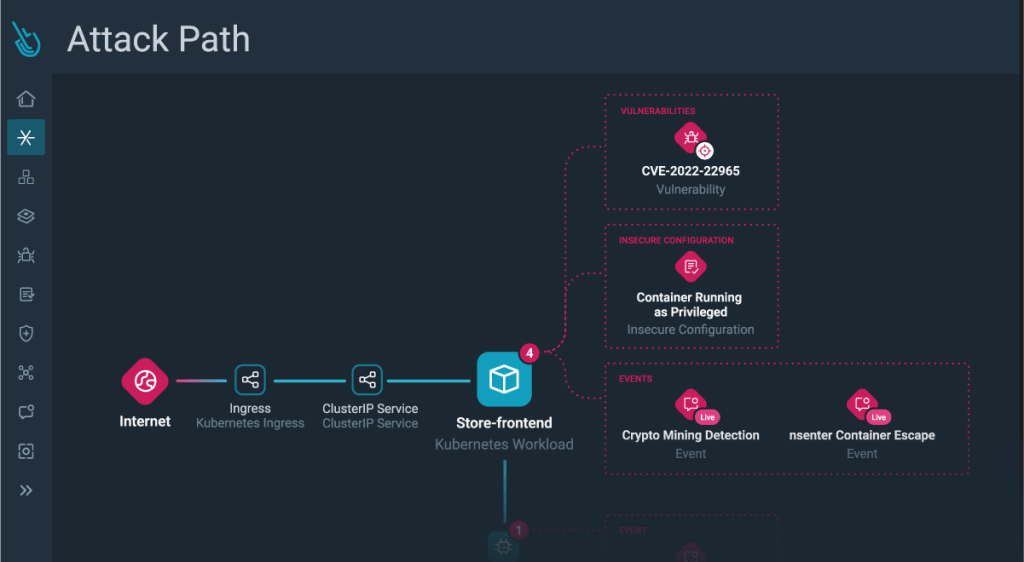
- From all the features I have seen in , the followings were highlights for me:
- Falco
- I have never heard about Falco until I attended this workshop.
- Falco is a cloud-native security tool designed for Linux systems. It employs custom rules on kernel events, which are enriched with container and Kubernetes metadata, to provide real-time alerts. Falco helps you gain visibility into abnormal behavior, potential security threats, and compliance violations, contributing to comprehensive runtime security.
- If you want to know more about Falco, read this article, https://sysdig.com/learn-cloud-native/what-is-falco/
- Importance of drift detection in container environments – cluster configuration drift can be detected and solved using ArgoCD.
- Security context for a Pod or Container
- A Kubernetes security context is a set of security settings that are applied at the pod or container level. It provides you with the ability to define privilege and access controls for pods or containers.
- You can set a security context as part of a pod’s deployment manifest, typically defined as a YAML file.
- It looks like below.

- Pod Security Standards
- The Pod Security Standards define three different policies to broadly cover the security spectrum. These policies are cumulative and range from highly-permissive to highly-restrictive. This guide outlines the requirements of each policy.
- Privileged Unrestricted policy, providing the widest possible level of permissions. This policy allows for known privilege escalations.
- Baseline Minimally restrictive policy which prevents known privilege escalations. Allows the default (minimally specified) Pod configuration.
- Restricted Heavily restricted policy, following current Pod hardening best practices.
- The Pod Security Standards define three different policies to broadly cover the security spectrum. These policies are cumulative and range from highly-permissive to highly-restrictive. This guide outlines the requirements of each policy.
- NetworkPolicies
- Kubernetes has a built-in firewall which you configure through YAML documents called NetworkPolices. These can have rules not just based on IPs or CIDR blocks/ranges – but based on Kubernetes Namespaces and Labels.
- Kubernetes network policy lets administrators and developers enforce which network traffic is allowed using rules.
- Kubernetes network policy lets developers secure access to and from their applications using the same simple language they use to deploy them. Developers can focus on their applications without understanding low-level networking concepts. Enabling developers to easily secure their applications using network policies supports a shift left DevOps environment.
- In Kubernetes network policy, you create ingress and egress “allow” rules independently (egress, ingress, or both).
- Role, ClusterRole, RoleBinding, ClusterRoleBinding
- A Role always sets permissions within a particular namespace; when you create a Role, you have to specify the namespace it belongs in.
- ClusterRole, by contrast, is a non-namespaced resource. The resources have different names (Role and ClusterRole) because a Kubernetes object always has to be either namespaced or not namespaced; it can’t be both. ClusterRoles have several uses. You can use a ClusterRole to:
- define permissions on namespaced resources and be granted access within individual namespace(s)
- define permissions on namespaced resources and be granted access across all namespaces
- define permissions on cluster-scoped resources
- A role binding grants the permissions defined in a role to a user or set of users. It holds a list of subjects (users, groups, or service accounts), and a reference to the role being granted.
- A RoleBinding grants permissions within a specific namespace whereas a ClusterRoleBinding grants that access cluster-wide.
- CIS Benchmark EKS
- This CIS Benchmark is the product of a community consensus process and consists of secure configuration guidelines developed for Kubernetes, https://www.cisecurity.org/benchmark/kubernetes
- CIS Kubernetes, https://aws.amazon.com/blogs/containers/introducing-cis-amazon-eks-benchmark/
- Container Network Interface (CNI)
- Controlling networks within Kubernetes clusters is mostly dependent on the Container Network Interface (CNI). CNI is an important component of the Kubernetes environment that allows easy networking and communication between containers and other networks. Let’s briefly discuss the Container Network Interface (CNI).
- This articles details about CNI.
Key takeways
Out of all of the learning, the key takeaways message for attendees were below:
- NOT RUNNING as root – fixes a lot of security issues, hence it is very important to run containers as non-root and with minimal privileges.
- Use pod security standard – restricted wherever possible
2. GitOps with Argo CD and Rollouts Training & Certification
This workshop was jam packed – great contents including labs. The workshop attendees were given two certifications training courses for free (worth of US$78).
- GitOps Fundamentals, https://learning.codefresh.io/
- GitOps at Scale
Below are learning summary from GitOps Fundamentals – mainly GitOps Principles, Argo CD and Helm chart.
Argo CD and DevSecOps Specific Learning
- Argo CD Overview
- I did not know that Argo CD is part of the Argo family of projects
- Argo Workflows : Kubernetes-native workflow engine supporting DAG and step-based workflows.
- Argo CD: Declarative continuous delivery with a fully-loaded UI.
- Argo Rollouts: Advanced Kubernetes deployment strategies such as Canary and Blue-Green made easy.
- Argo Events : Event based dependency management for Kubernetes.

- Sourced from, https://github.com/alexmt/argo-ecosystem-demo?tab=readme-ov-file
- I did not know that Argo CD is part of the Argo family of projects
- Argo CD Details
- Argo CD is a declarative, GitOps continuous delivery tool for Kubernetes.
- Why Argo CD? – Application definitions, configurations, and environments should be declarative and version controlled. Application deployment and lifecycle management should be automated, auditable, and easy to understand.
- How it works? – Argo CD follows the GitOps pattern of using Git repositories as the source of truth for defining the desired application state. Kubernetes manifests can be specified in several ways:
- kustomize applications
- helm charts
- jsonnet files
- Argo CD is implemented as a Kubernetes controller which continuously monitors running applications and compares the current, live state against the desired target state (as specified in the Git repo). A deployed application whose live state deviates from the target state is considered
OutOfSync. Argo CD reports & visualizes the differences, while providing facilities to automatically or manually sync the live state back to the desired target state. Any modifications made to the desired target state in the Git repo can be automatically applied and reflected in the specified target environments.
- GitOps Principles
- As per CNCF, GitOps encompasses several guiding principles. These include the following:
- The Entire System is in a Declarative State – Declarative desired state. GitOps demands an infrastructure that’s always declarative. It should also concentrate on the target configuration. In other words, it focuses on the desired state and enables the system to execute whatever it needs to realize a desired state.
- The Canonical Desired State Versioned in Git – Immutable desired state versions. When it comes to GitOps, the canonical state is essentially the “source of truth” state. For example, when the state is stored and versioned in source control, it must be viewed as a source of truth.
- Continuous state reconciliation – Automatically Apply Approved Changes in the System. Once you store the declared state in Git, you must allow all changes to that state to be applied automatically to your system through pull requests (PR) or merge requests (MR). You won’t need cluster credentials to make changes to the system.
- Many GitOps concepts and benefits are rooted in IaC. This also reflects a core foundational concept of GitOps. However, to put it simply, GitOps concentrates on automating tasks around Kubernetes clusters and deployments. IaC essentially focuses on the underly infrastructure like everything Kubernetes clusters need to run smoothly.
- Operations through declaration
- As per CNCF, GitOps encompasses several guiding principles. These include the following:
- GitOps deployments in Kubernetes case (Below is the extract from the course materials)
- A GitOps agent is deployed on the cluster.
- The GitOps agent is monitoring one or more Git repositories that define applications and contain Kubernetes manifests (or Helm charts or Kustomize files).
- Once a Git commit happens the GitOps agent is instructing the cluster to reach the same state as what is described in Git.
- Developers, operators. and other stakeholders perform all changes via Git operations and never directly touch the cluster (or perform manual kubectl commands).
- GitOps and IaC scanning: Shifting security left by scanning Kubernetes manifests before deployment.
- Helm Chart
- Helm is an open-source graduated CNCF project originally created by DeisLabs as a third-party utility, now known as the package manager for Kubernetes, focused on automating the Kubernetes applications lifecycle in a simple and consistent way (think apt or yum).
- Helm is a tool that streamlines installation and management of Kubernetes applications. It uses a packaging format called “charts”, which are a collection of files that describe Kubernetes resources. It can run anywhere (laptop, CI/CD, etc.) and is available for various operating systems, like OSX, Linux and Windows.

- Sourced from, https://ibm.github.io/helm101/
- A chart is organized as a collection of files inside of a directory where the directory name is the name of the chart. It contains template YAML files which facilitates providing configuration values at runtime and eliminates the need of modifying YAML files. These templates provide programming logic as they are based on the Go template language, functions from the Sprig lib and other specialized functions.
- Chart – It contains all of the resource definitions necessary to run an application, tool, or service inside of a Kubernetes cluster. A chart is basically a package of pre-configured Kubernetes resources.
- Config – Contains configuration information that can be merged into a packaged chart to create a releasable object.
- helm – Helm client. It renders charts into manifest files. It interacts directly with the Kubernetes API server to install, upgrade, query, and remove Kubernetes resources.
- Release – An instance of a chart running in a Kubernetes cluster.
- Repository – Place where charts reside and can be shared with others.
- Key takeways
- Must have CI setup before using ArgoCD
Further Learning
If you are new to Kubernetes, Workshop – 1 & 2 contents will be hard to understand and follow. The following resources could be used to learn basic of Kubernetes concepts and practice first.
- Excellent video resource. Use powerpoint and then demo. If you prefer PPT approach, this video will give you good basic overview of Kubernetes.
- Kubernetes Tutorial for Beginners [FULL COURSE in 4 Hours], https://www.youtube.com/watch?v=X48VuDVv0do&t=1050s&ab_channel=TechWorldwithNana
- If you prefer whiteboarding teaching approach, this below video is excellent.
- Kubernetes Beginner To Expert Level In One Video | Ultimate Kubernetes Guide, https://www.youtube.com/watch?v=JoHUi9KvnOA&t=2009s&ab_channel=Abhishek.Veeramalla
- After you watch the video, read this blog, https://devopscube.com/learn-kubernetes-complete-roadmap/
- And practice practice practice 😇😇😇
- If you want to read concepts, the followings are good resources:
- EVERYTHING KUBERNETES: A PRACTICAL GUIDE, https://iamondemand.com/wp-content/uploads/2019/11/Kubernetes-eBook.pdf
- Demystifying Kubernetes with 100 slides, https://collabnix.com/wp-content/uploads/2022/02/Understand-Kubernetes-in-100-slides.pdf
- I was also recommended that the following certifications would give a good practical knowledge for someone starting out in learning Kubernetes.
- Certified Kubernetes Application Developer (CKAD),https://training.linuxfoundation.org/certification/certified-kubernetes-application-developer-ckad/
- Certified Kubernetes Administrator (CKA), https://training.linuxfoundation.org/certification/certified-kubernetes-administrator-cka/
- Certified Kubernetes Security Specialist (CKS), https://training.linuxfoundation.org/certification/certified-kubernetes-security-specialist/
- To learn and practise ArgoCD and Helm chart, the followings might be useful.
Summary
These two workshops provided practical insights into securing Kubernetes environments and implementing efficient GitOps practices including ArgoCD and helm chart. I was hesitant to attend since I have just started learning Kubernetes, but I am very glad that I attended the workshops. These workshop provided me with overview of important concepts which enable me to further explore learning myself.
I believe these workshops are valuable for attendees regardless of their existing kubernetes knowledge level. I hope you learned something from this blog post and help you further progress in your kubernetes learning journey!
References
- Argo CD Overview, https://argo-cd.readthedocs.io/en/stable/
- Cloud Infrastructure Entitlement Management (CIEM), https://www.paloaltonetworks.com.au/cyberpedia/what-is-ciem
- Cloud native, https://about.gitlab.com/topics/cloud-native/
- CNAPP, https://www.crowdstrike.com/cybersecurity-101/cloud-security/cloud-native-application-protection-platform-cnapp/
- falco, https://falco.org
- GitOps 101: What’s it all about? , https://www.cncf.io/blog/2021/09/28/gitops-101-whats-it-all-about/
- Kubernetes, https://collabnix.com/wp-content/uploads/2022/02/Understand-Kubernetes-in-100-slides.pdf
- Kubernetes community Day, Sydney Agenda for Day 1 and 2, https://community.cncf.io/events/details/cncf-kcd-australia-presents-kcd-sydney-24/
- Strengthen Cybersecurity with Shift-left and Shield-right Practices, By Eric Carter – NOVEMBER 11, 2022, https://sysdig.com/blog/strengthen-cybersecurity-with-shift-left-and-shield-right-practices/
- wireshark, https://www.wireshark.org/
 suKTech24
Leave a comment