

By suktech24, Tue 24 Sep 2024, Estimated reading time : 6-8 mins
I attended ClickHouse workshop (4hrs), https://dataengconf.com.au/sydney/workshops by Johnny Mirza, as part of DataEngBytes conference. The workshop covered topics ranging from designing a table, multiple use cases, MergeTree table engine and MergeTree family, granule, parts, tips to create efficient schemas, queries to performance optimization. The workshop materials are available at this link, https://tinyurl.com/4aukzj9e. The workshop was insightful, and interactive.
In this blog post, I would like to share key takeaway lessons I learned from the workshop and resources that can be used for further studies.
1. ClickHouse Operations
- A ClickHouse server can process and insert data in parallel. The level of insert parallelism impacts the ingest throughput and memory usage of a ClickHouse server. Loading and processing data in parallel requires more main memory but increases the ingest throughput as data is processed faster.
- Duplicate Data:
- Option 1 : Wait for the automatic merge process to remove duplicates.
- Option 2 : Use the
FINALcommand to mask duplicate data, marking it for deletion, but without immediately removing it from the disk. But in the best practices, it seems to recommend avoiding the use of `OPTIMIZE TABLE … FINAL` as the process consume huge CPU and IO consumption. - Lightweight Delete : Data marked as deleted by the query engine isn’t immediately deleted from disk parts, allowing efficient handling of deleted data.
- When a
DELETE FROM table ...query is executed, ClickHouse saves a mask where each row is marked as either “existing” or as “deleted”. Those “deleted” rows are omitted for subsequent queries. However, rows are actually only removed later by subsequent merges. Writing this mask is much more lightweight than what is done by anALTER TABLE ... DELETEquery.
- When a
2. Data Types
- Dictionaries
- A dictionary in ClickHouse provides an in-memory key-value representation of data from various internal and external sources, optimizing for super-low latency lookup queries. Dictionaries are useful for:
- Improving the performance of queries, especially when used with
JOINs - Enriching ingested data on the fly without slowing down the ingestion process
- Improving the performance of queries, especially when used with
- A dictionary in ClickHouse provides an in-memory key-value representation of data from various internal and external sources, optimizing for super-low latency lookup queries. Dictionaries are useful for:
- Tuples
- While tuples are fast in ClickHouse, they aren’t ideal when dealing with frequent schema changes.
- Nullable data
- To store
Nullabletype values in a table column, ClickHouse uses a separate file withNULLmasks in addition to normal file with values. Entries in masks file allow ClickHouse to distinguish betweenNULLand a default value of corresponding data type for each table row. Because of an additional file,Nullablecolumn consumes additional storage space compared to a similar normal one.
- To store
3. Denormalization in ClickHouse
- Data denormalization is a technique in ClickHouse to use flattened tables to help minimize query latency by avoiding joins.
4. ETL Tools, Drivers and Integrations
- Supports network interfaces : HTTP, Native TCP (less overhead), gRPC
- Drivers : commandline client, JDBC, ODBC drivers, C++ client, library
- Integration libraries
- ETL tools to move data from an external data source into clickhouse : Airbyte, dbt, vector
- Client libraries
5. Materialized Views vs Projections
- Materialized Views :
- A materialized view is a special trigger that stores the result of a
SELECTquery on data, as it is inserted, into a target table. he result of this query is inserted into a second “target” table. Should more rows be inserted, results will again be sent to the target table where the intermediate results will be updated and merged. This merged result is the equivalent of running the query over all of the original data. - Materialized views in ClickHouse are updated in real time as data flows into the table they are based on, functioning more like continually updating indexes.
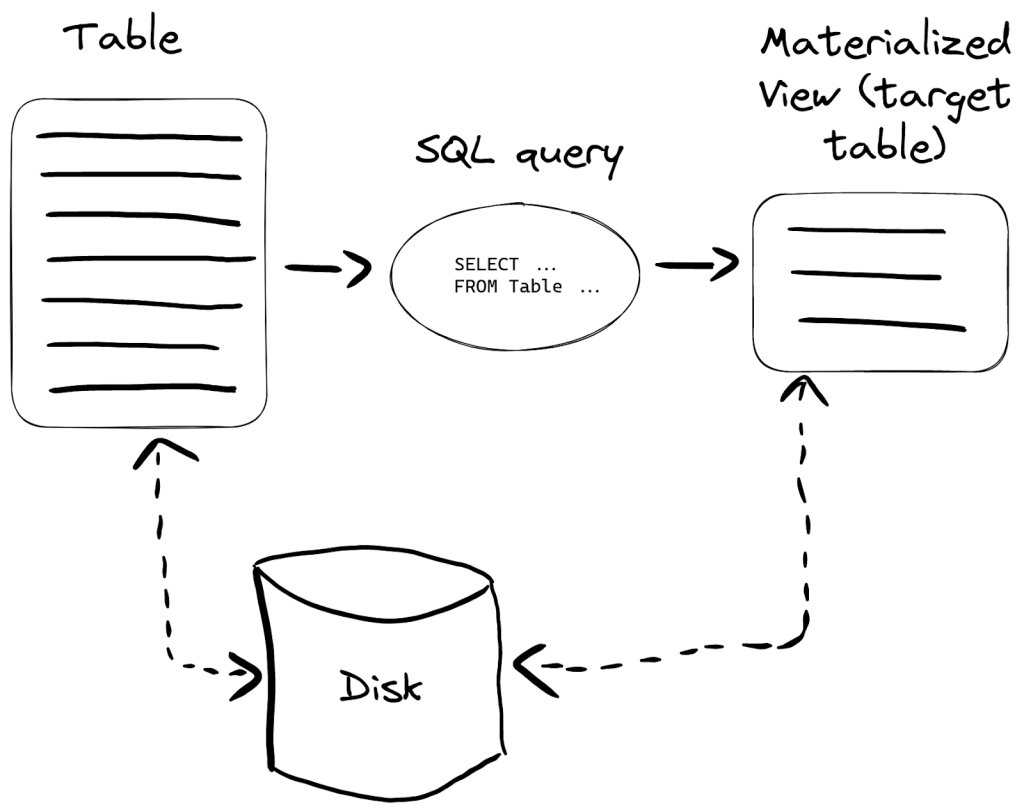
- image sourced from ClickHouse
- A materialized view is a special trigger that stores the result of a
- Projections :
- Projections store data in a format that optimizes query execution, this feature is useful for :
- Running queries on a column that is not a part of the primary key
- Pre-aggregating columns, it will reduce both computation and IO
- Disk usage
- Projections will create internally a new hidden table, this means that more IO and space on disk will be required. Example, If the projection has defined a different primary key, all the data from the original table will be duplicated.
- Limitations
- Projections don’t allow to use different TTL for the source table and the (hidden) target table, materialized views allow different TTLs.
- Projections don’t currently support
optimize_read_in_orderfor the (hidden) target table. - Lightweight updates and deletes are not supported for tables with projections.
- Materialized views can be chained: the target table of one materialized view can be the source table of another materialized view, and so on. This is not possible with projections.
- Projections don’t support joins; materialized views do.
- Projections don’t support filters (WHERE clause); materialized views do.
- Projections store data in a format that optimizes query execution, this feature is useful for :
- Materialized views are often preferred over projections for performance improvements and query optimization.
6. Optimization Techniques
- Data Type Optimization
- Certain data types use more CPU and memory than others, making data type selection crucial during the table creation stage to optimize performance.
- e.g. Date is faster than > DateTime > DateTime64
- Options for creating additional primary indices
- There are several strategies to create additional primary indexes:
- Create two tables with different primary keys, i.e., create a second table with a different primary key.
- Create a materialized view on existing table
- Add a projection to existing table for optimized querying.
- Define skipping indexes to further enhance query performance.
- There are several strategies to create additional primary indexes:
- Optimize join operations with proper sorting orders
- Fine-tune thread numbers for queries
- ClickHouse uses threads from the Global Thread pool to process queries and also perform background operations like merges and mutations. If there is no idle thread to process a query, then a new thread is created in the pool.
- The maximum size of the global thread pool is determined by the
max_thread_pool_sizesetting, which defaults to 10,000. You can modify this value in your config. - If you modify
max_thread_pool_size, we recommend changingthread_pool_queue_sizeto be the same value. Thethread_pool_queue_sizesetting is the maximum number of jobs that can be scheduled on the Global Thread pool
- Performance monitoring
- Regularly analyze top CPU-intensive and memory-intensive queries
- Key metrics to monitor include:
- Longest running queries.
- CPU and memory usage.
- Sorting efficiency in JOIN operations to optimize query performance.
- Track the following query types for performance:
- Top 10 most CPU-intensive queries.
- Top 10 most memory-intensive queries.
- Longest-running queries.
- Measure and fine-tune the number of threads per query, especially CPU, memory, and latency peaks.
- Avoid optimize final
- Using the
OPTIMIZE TABLE ... FINALquery will initiate an unscheduled merge of data parts for the specific table into one data part. During this process, ClickHouse reads all the data parts, uncompresses, merges, compresses them into a single part, and then rewrites back into object store, causing huge CPU and IO consumption. Note that we generally recommend against usingOPTIMIZE TABLE ... FINALas its use case is meant for administration, not for daily operations.
- Using the
7. Race Condition
- Race condition are not a concern in ClickHouse. Once data is written to parts on disk, it can be queried immediately without issues.
8. Skipping Indexes
- Skipping indexes enable ClickHouse to skip reading significant chunks of data that are guaranteed to have no matching values.
9. Time Complexity
- ClickHouse queries time complexity is
log n
Summary
- ClickHouse Operations : A ClickHouse server can process and insert data in parallel. The level of insert parallelism impacts the ingest throughput and memory usage of a ClickHouse server.
- Data Types : Choose right data types
- Denormalization : Data denormalization is a technique in ClickHouse to use flattened tables to help minimize query latency by avoiding joins.
- ETL tools, driver and integrations : Clickhouse supports network interfaces, drivers and has various integration libraries and client libraries.
- Materiazlied Views vs Projections
- Optimization Techniques : data type optimization, options for creating additional primary indexes, fine-tune thread numbers for queries, performance monitoring, avoiding optimize final
- Race condition : is not a concern. Once data is written to parts on disk, it can be queried immediately without issues.
- Skipping indexes : Skipping indexes enable ClickHouse to skip reading significant chunks of data that are guaranteed to have no matching values.
- Time complexity : Clickhouse queries time complexity is log n.
As a ClickHouse learner, I have listed below resources for further learnings/practice for myself. If you are interested, you can install ClickHouse locally or create ClickHouse cloud account and experiment with it. Happy learning!
- A Practical Introduction to Primary Indexes in ClickHouse, https://clickhouse.com/docs/en/optimize/sparse-primary-indexes
- ClickHouse Academy, https://github.com/ClickHouse/clickhouse-academy
- ClickHouse Tutorials 5 part series by Hamed Karbasi, Jun 2 2023, https://dev.to/hoptical/clickhouse-basic-tutorial-an-introduction-52il
- ClickHouse Performance: Mastering ClickHouse Thread Tuning, Shiv Iyer, Jul 8 2024, https://medium.com/@ShivIyer/clickhouse-performance-mastering-clickhouse-thread-tuning-b0ebb041dec7
- Databyte workshop materials, https://tinyurl.com/4aukzj9e
- Denormalizing Data, https://clickhouse.com/docs/en/data-modeling/denormalization
- Dictionary, https://clickhouse.com/docs/en/dictionary
- Essential Monitoring Queries – part 1 – INSERT Queries, Camilo Sierra, Dec 28 2022, https://clickhouse.com/blog/monitoring-troubleshooting-insert-queries-clickhouse
- Essential Monitoring Queries – part 2 – SELECT Queries, Camilo Sierra, Jan 3 2023, https://clickhouse.com/blog/monitoring-troubleshooting-select-queries-clickhouse
- Explain types, https://clickhouse.com/docs/en/sql-reference/statements/explain#explain-types
- Getting started with ClickHouse? Here are 13 “Deadly Sins” and how to avoid them, Dale McDiarmid, Tom Schreiber & Geoff Genz, Oct 26 2022, https://clickhouse.com/blog/common-getting-started-issues-with-clickhouse
- How to increase the number of threads available?, https://clickhouse.com/docs/knowledgebase/how-to-increase-thread-pool-size
- Optimizing ClickHouse Performance: Strategies for Identifying and Reducing Over-fetching in SELECT Queries, Shiv Iyer, https://dev.to/shiviyer/optimizing-clickhouse-performance-strategies-for-identifying-and-reducing-over-fetching-in-select-queries-5da
- OPTIMIZE Statement, https://clickhouse.com/docs/en/sql-reference/statements/optimize
- Optimizing Clickhouse: The Tactics That Worked for Us, Vadim Korolik, Apr 30 2024, https://www.highlight.io/blog/lw5-clickhouse-performance-optimization
- Projections, https://clickhouse.com/docs/en/sql-reference/statements/alter/projection
- Super charging your ClickHouse queries, Tom Schreiber, Dec 15 2022, https://clickhouse.com/blog/clickhouse-faster-queries-with-projections-and-primary-indexes
- Supercharging your large ClickHouse data loads – Performance and resource usage factors, Tom Schreiber, Sep 19 2023, https://clickhouse.com/blog/supercharge-your-clickhouse-data-loads-part1
- Supercharging your large ClickHouse data loads – Tuning a large data load for speed, Tom Schreiber, Oct 18 2023, https://clickhouse.com/blog/supercharge-your-clickhouse-data-loads-part2
- Use EXPLAIN SYNTAX to optimize queries, https://www.tinybird.co/clickhouse/knowledge-base/optimize-queries-explain
- Understanding ClickHouse Data Skipping Indexes, https://clickhouse.com/docs/en/optimize/skipping-indexes
- Using Materialized Views in ClickHouse, Denys Golotiuk, Jan 19 2023, https://clickhouse.com/blog/using-materialized-views-in-clickhouse
 suKTech24
Leave a comment