

DNS in cybersecurity
By suktech24, Sun 27 Oct 2024, Estimated reading time : 16-18 mins
The Domain Name System (DNS) is often referred to as the “phonebook of the internet.” It plays a crucial role in enabling smooth communication across the internet by translating domain names into IP addresses. In cybersecurity, DNS serves as both an essential service and a point of vulnerability. Its integral role in internet infrastructure makes it a key target for cyberattacks, which can disrupt service or compromise sensitive data. In this blog post, below topics will be explored :
- What is DNS?
- DNS servers and record types
- 2.1. DNS Servers
- 2.2. DNS Record Types
- 2.3. DNS Service Types Differences
- How does DNS work?
- DNS Queries
- DNS Lookups
- DNS Attacks Types
- DNS security practices
- CVE Examples and MITRE ATT&CK
- Summary
1. What is DNS?
The Domain Name System (DNS) is the phonebook of the Internet. We access information online through domain names, like http://www.google.com or https://novakdjokovic.com/en/. Web browsers interact through Internet Protocol (IP) addresses. DNS translates domain names to IP addresses so browsers can load Internet resources.
Each device connected to the Internet has a unique IP address which other machines use to find the device. DNS servers eliminate the need for us to memorize IP addresses such as IPv4: 8.8.8.8 (https://dns.google/)and/or 8.8.4.4 and for IPv6: 2001:4860:4860::8888 and/or 2001:4860:4860::8844. When we open a web browser and go to a website, we don’t have to remember a number like 8.8.8.8. Instead, we can enter a domain name like google.com and still get the site.
2. DNS Servers and Record Types
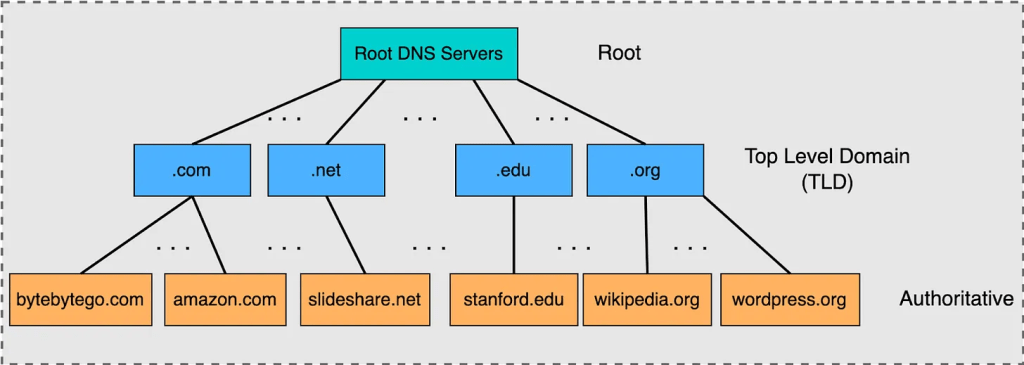
DNS operates as a distributed, hierarchical system. The process of DNS resolution involves converting a hostname into a computer-friendly IP address. When a client searches for a hostname—typically through a web browser—their network’s DNS provider executes a multi-step resolution process via the following four servers in order to find and return the appropriate IP address.
2.1. DNS Servers
- DNS recursor (resolver)
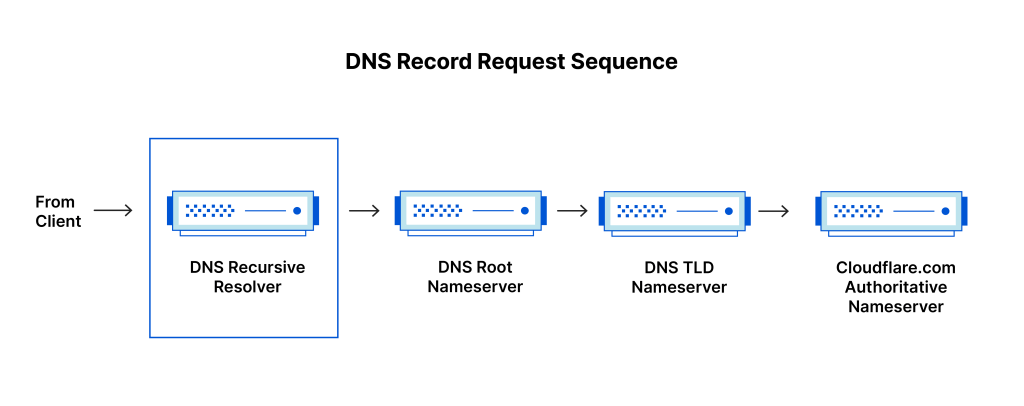
- The recursor can be thought of as a librarian who is asked to go find a particular book somewhere in a library. The DNS recursor is a server designed to receive queries from client machines through applications such as web browsers. Typically the recursor is then responsible for making additional requests in order to satisfy the client’s DNS query.
- The recursor will also cache information in order to respond faster to subsequent client requests.
- Root nameserver
- The root server is the first step in translating (resolving) human readable host names into IP addresses. It can be thought of like an index in a library that points to different racks of books – typically it serves as a reference to other more specific locations.
- It stores the IP addresses of Top Level Domain (TLD) name servers. There are 13 logical root name servers globally.
- Top Level Domain server
- The top level domain server (TLD) can be thought of as a specific rack of books in a library. This nameserver is the next step in the search for a specific IP address, and it hosts the last portion of a hostname.
- It stores the IP addresses of authoritative name servers. There are several types of TLD names. For example, generic TLD (.com, .org), country code TLD (.us), test TLD (.test).
- Authoritative nameserver
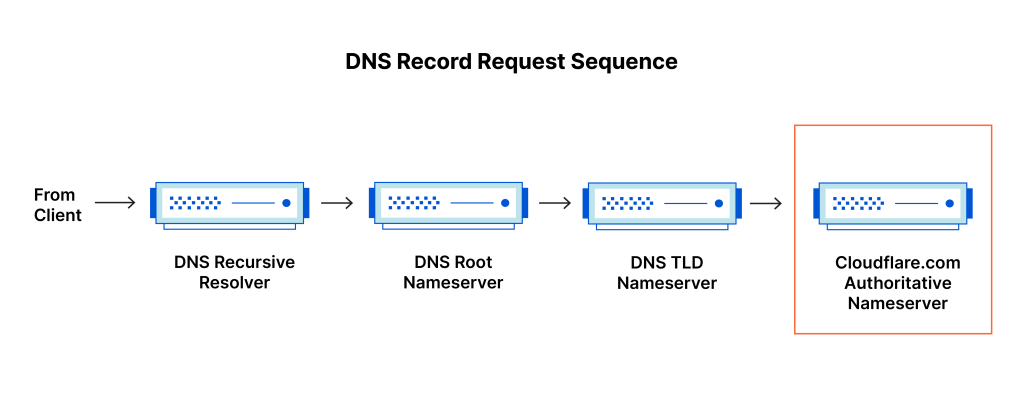
- This final nameserver can be thought of as a dictionary on a rack of books, in which a specific name can be translated into its definition. The authoritative nameserver is the last stop in the nameserver query. If the authoritative name server has access to the requested record, it will return the IP address for the requested hostname back to the DNS Recursor (the librarian) that made the initial request.
- You can register authoritative name servers with domain name registrar such as GoDaddy, Namecheap, etc.
Below illustrates the DNS hierarchy. Sourced from bytebytego.com, https://blog.bytebytego.com/p/a-crash-course-in-dns-domain-name
2.2. DNS Record Types
- A Record: Maps a domain name to an IPv4 address.
- AAAA Record: Maps a domain name to an IPv6 address.
- CNAME Record: (Host aliasing) Provides an alias for one domain name to another.
- MX Record: (Email Routing) Specifies the mail server responsible for receiving email on behalf of the domain.
- TXT Record: Contains text information for various uses, including security practices like SPF and DKIM for email validation.
Refer to List of DNS record types from Wikipedia for more resource record types. https://en.wikipedia.org/wiki/List_of_DNS_record_types
2.3. DNS Service Types Differences
Below table outlines the differences between authoritative DNS server and recursive DNS resolver.
| Area | Authoritative DNS Server | Recursive DNS Resolver |
| Role | Holds and provides DNS records for specific domains. It is the final source of truth for DNS queries. | Responds to client requests by querying other DNS servers, including authoritative servers, to retrieve DNS records. |
| Data Ownership | Owns the DNS records and can provide answers directly from its own data. | Does not own DNS records but retrieves and caches them from authoritative DNS servers. |
| Caching | No caching; always provides authoritative data directly from its database. | Caches DNS records to reduce future lookup times and respond faster to repeated queries. |
| Direct Client Interaction | Typically does not interact directly with clients; responds to queries from recursive resolvers. | Receives DNS queries from clients and is responsible for finding the necessary DNS information. |
| Position in DNS Lookup Chain | Final stage in the DNS lookup process, where the requested resource record is retrieved. | The first stage in the DNS lookup process, responsible for starting the query process to find the correct DNS record. |
| Query Behavior | Responds only to queries related to the domains it is responsible for. | Queries multiple servers to find the DNS record, if not cached, until it reaches the authoritative DNS server. |
| Example | Amazon Route 53 is an example of an authoritative DNS system. | A DNS resolver provided by an ISP or a public DNS service (like Google DNS) acts as a recursive DNS resolver. |
Below diagrams illustrates Authoritative DNS Server and Recursive DNS Resolver positions in DNS record request sequence. (Diagrams from cloudflare, https://www.cloudflare.com/en-gb/learning/dns/what-is-dns/)
3. How does DNS work?
The basic DNS process is outlined below.
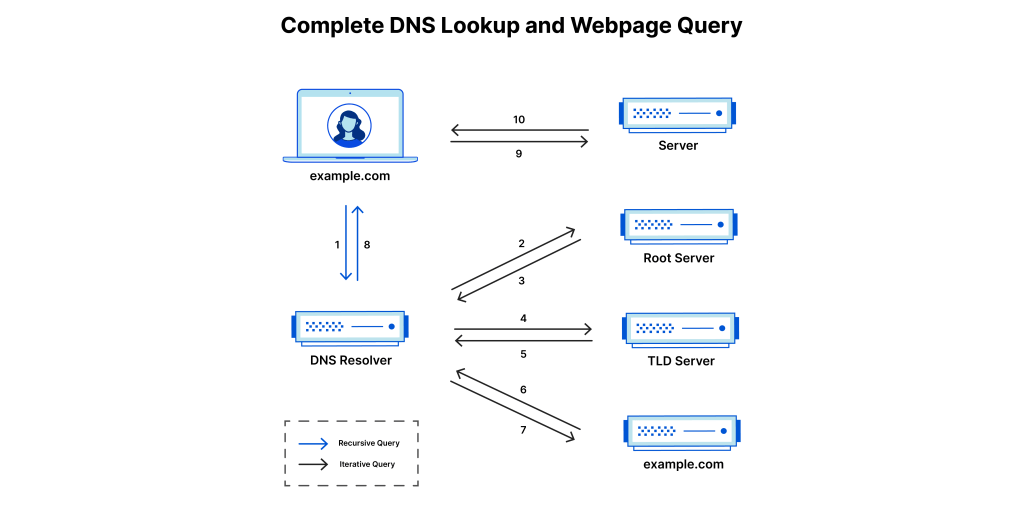
- User enters domain : A user types ‘example.com’ into a web browser and the query travels into the Internet and is received by a DNS resolver.
- DNS resolver : The device then sends a DNS query to a DNS resolver, usually provided by ISP or a third party services like Google DNS.
- Recursive or Iterative Resolutions : The resolver then looks for IP address using either recursive or iterative resolution.
- Root DNS Server : If the resolver does not know the IP address, it queries the root DNS server. The root server does not know the IP, but responds to the resolver with the address of a Top Level Domain (TLD) DNS server (such as .com or .net), which stores the information for its domains. When searching for example.com, our request is pointed toward the .com TLD. The resolver then makes a request to the .com TLD.
- TLD Server : The resolver then queries TLD (e.g. .com server) then responds with the IP address of the domain’s nameserver, example.com.
- Authoritative DNS Server : The authoritative DNS server responds with the IP address for http://www.example.com
- Returning the IP address : The IP address for example.com is then returned to the resolver from the nameserver.
- Getting IP address : The DNS resolver then responds to the web browser with the IP address of the domain requested initially.
- Once the 8 steps of the DNS lookup have returned the IP address for example.com, the browser is able to make the request for the web page:
- HTTP Request : The browser makes a HTTP request to the IP address.
- Webpage : The server at that IP returns the webpage to be rendered in the browser (step 10). Below image is referenced from Cloudflare, https://www.cloudflare.com/en-gb/learning/dns/what-is-dns/
Each of these steps involves complex interactions that cyber attackers can exploit if proper security measures are not in place.
4. DNS Queries
There are three primary types of DNS queries:
- Recursive Query
- Iterative Query
- Non-Recursive Query: The DNS server responds from its cache, without querying other servers.
Below is a brief comparison of Iterative vs Recursive DNS resolution. For detailed steps in each types of query, visit this site, https://blog.bytebytego.com/p/a-crash-course-in-dns-domain-name.
| Feature | Iterative DNS Resolution | Recursive DNS resolution |
| How it works | The DNS server responds with the best information it has, often referring the client to another DNS server. The DNS server receiving the query provides referrals to the querying server, guiding it through the DNS hierarchy. The querying server actively participates in the process by sending subsequent queries based on the referrals received. | The DNS server takes full responsibility for responding to the client’s request of finding the IP address and does not return until it has an answer or an error. |
| Responsibility | The client (or local resolver) is responsible for querying each DNS server. | The DNS resolver takes on the responsibility of contacting other DNS servers to resolve the domain name. |
| Number of requests | The client makes multiple requests to different DNS servers until it finds the IP address. | The client makes a single request to the resolver, which makes multiple queries internally |
| Load on client | Higher as the client needs to contact multiple DNS servers | Lower as the client needs to make one query and the resolver handles the rest |
| Caching | Yes |
- Example
- Google Public DNS is a recursive DNS resolver, similar to other publicly available services.
- Get-DnsServerRecursion
- The Get-DnsServerRecursion cmdlet retrieves Domain Name System (DNS) server recursion settings. Recursion occurs when a DNS server queries other DNS servers on behalf of a requesting client, and then sends the answer back to the client.
- https://learn.microsoft.com/en-us/powershell/module/dnsserver/get-dnsserverrecursion?view=windowsserver2022-ps
5. DNS Lookups
There are two main types of DNS lookups:
- Forward Lookup:
- Converts a domain name to an IP address.
- Reverse Lookup:
- Converts an IP address into a domain name.
- Reverse lookups are used in various situations such as email authentication, logging, network security and troubleshooting network issues.
- For example, reverse DNS records are widely used in combating e-mail spam by verifying the sender of an e-mail message. The receiving mail server retrieves the reverse DNS record of the sending server’s IP address. Then the receiving mail server verifies if that host is authorized to send e-mail from the originating domain.
- Logging software also employs reverse lookups in order to provide users with human-readable domains in their log data, as opposed to a bunch of numeric IP addresses.
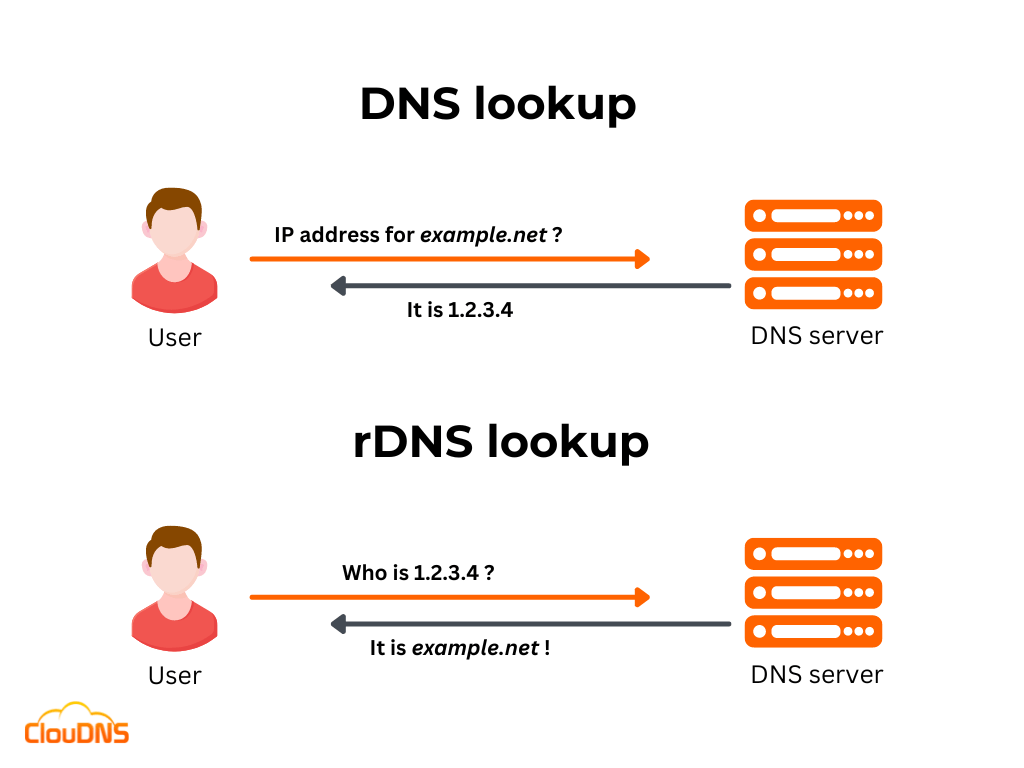
Image referenced from cloudns.net, https://www.cloudns.net/blog/reverse-dns-ptr-record/. For more detail about reverse DNS lookup, read the article from cloudns and Overview of reverse DNS and support in Azure, https://learn.microsoft.com/en-us/azure/dns/dns-reverse-dns-overview.
In cybersecurity, monitoring DNS lookups is important as unusual patterns can signal malicious activities such as command-and-control (C2) communications or data exfiltration.
6. DNS Attacks types
DNS-based attacks are among the most common and dangerous threats to internet infrastructure. It is an attack that targets :
- Availability or stability of a network’s DNS service
- Resolution of domain names to IP address
- Redirecting users to malicious websites
- Intercepting the internet traffic to gain unauthorized access
DNS attacks works by exploiting vulnerabilities in the DNS protocol or Infrastructure. Here are some of the most significant types of DNS attacks.
| Attack Type | Explanation |
| DNS Hijacking Go to this for details, https://www.imperva.com/learn/application-security/dns-hijacking-redirection/ | It is an attack that tricks the end users into thinking they are communicating with a legitimate domain name when in reality it is communicating with a domain name or IP address that the attacker has set up. This is also sometimes called DNS Redirection. |
| DNS Spoofing https://www.mimecast.com/content/dns-spoofing/ | DNS records or communication are intercepted and altered in order to route users to a different IP address. Traffic from legitimate servers is rerouted to fraudulent sites that may look like the valid site the end-user was trying to get to. Types of DNS spoofing – 1. Man-in-the-middle duping – 2. DNS cache poisoning by spam – 3. DNS server hijack |
| DNS Amplification https://www.cisa.gov/news-events/alerts/2013/03/29/dns-amplification-attacks, https://www.cloudflare.com/en-gb/learning/ddos/dns-amplification-ddos-attack/ | DNS amplification is an asymmetrical DDoS attack in which the attacker sends out a small look-up query with spoofed target IP, making the spoofed target the recipient of much larger DNS responses. With these attacks, the attacker’s goal is to saturate the network by continuously exhausting bandwidth capacity |
| DNS Tunneling https://www.akamai.com/glossary/what-is-dns-tunneling https://unit42.paloaltonetworks.com/three-dns-tunneling-campaigns/ | DNS tunneling is an attack that enables attackers to establish covert communication channels by utilizing the DNS protocol, which was originally designed for translating domain names into IP addresses. The malicious actors exploit this communication process to hide and transport unauthorized data within DNS queries and responses. This method of data exfiltration and communication allows attackers to bypass traditional security mechanisms, such as firewalls and proxies, that usually monitor and filter internet traffic based on standard protocols. |
| DNS Flooding https://www.imperva.com/learn/ddos/dns-flood/ | DNS floods are symmetrical DDoS attacks. These attacks attempt to exhaust server-side assets (e.g., memory or CPU) with a flood of UDP requests, generated by scripts running on several compromised botnet machines. A DNS flood attack is considered a variant of the UDP flood attack, since DNS servers rely on the UDP protocol for name resolution, and is a Layer 7 attack. With UDP-based queries (unlike TCP queries), a full circuit is never established, and thus spoofing is more easily accomplished. |
| NXDOMAIN flood ( aka – pseudo-random subdomain (PRSD) DDoS attack, – DNS water torture, – DNS resource exhaustion attack ) It is a Layer 7 Application Layer attack https://www.akamai.com/glossary/what-is-nxdomain-ddos | In an NXDOMAIN DDoS attack, threat actors use botnets to send DNS queries to a targeted DNS server or resolver. These messages ask for IP addresses for websites or subdomains that do not exist. For each query, the DNS server must perform a lookup, which consumes a certain amount of resources. When the website cannot be found, DNS servers return an NXDOMAIN reply. By overwhelming the DNS infrastructure with so many of these requests, an NXDOMAIN attack can deplete the resources of the DNS server, leaving it unable to fulfill legitimate requests and preventing users from accessing websites. |
| Domain Generation Algorithm (DGA) Attack https://attack.mitre.org/techniques/T1637/001/ https://bluecatnetworks.com/blog/among-cyber-attack-techniques-what-is-a-dga/ | A Domain Generation Algorithm (DGA) is a technique used by cyber attackers to generate new domain names and IP addresses for malware’s command and control servers. Executed in a manner that seems random, it makes it nearly impossible for threat hunters to detect and contain the attack. |
| Volumetric Based DDoS Use massive amount of traffic saturating the bandwidth of the target. https://www.akamai.com/glossary/what-is-a-volumetric-attack | – UDP Flood – TCP Flood – DNS Amplification – NTP Amplification |
| Protocol Based DDoS Attacks that rends a target in-accessible by exploiting a weakness in the Layer 3 & 4 https://www.cdnetworks.com/glossary/protocol-ddos-attacks/ https://aurumme.com/atech/tcp-3-way-handshake-process/ | – SYN Flood – Ping of Death – ICMP Flood – LAND attack |
| Application Layer DDoS Attacks that exploit a weakness in the Layer 7 protocol stack. https://www.akamai.com/glossary/what-is-application-layer-ddos-attack | – HTTP Flood – Slowloris – Botnet DDoS – Border Gateway Protocol |
7. DNS Security Practices
DNS security, often referred to as DNSSEC (Domain Name System Security Extensions), is a set of protocols and techniques designed to protect the DNS from various threats and vulnerabilities. DNSSEC creates a secure domain name system by adding cryptographic signatures to existing DNS records. These digital signatures are stored in DNS name servers alongside common record types like A, AAAA, MX, CNAME, etc. By checking its associated signature, you can verify that a requested DNS record comes from its authoritative name server and wasn’t altered en-route, opposed to a fake record injected in a man-in-the-middle attack. https://www.cloudflare.com/en-au/dns/dnssec/how-dnssec-works/
The primary goal of DNS security is to ensure the integrity, authenticity, and confidentiality of DNS data. By doing so, it helps prevent malicious activities.
Below is the summary of DNS security practices. Refer to this original blog post written by Alex Biushkin for more details.
- Log all DNS activities: Maintain detailed DNS logs, analyze them regularly to detect security vulnerabilities, and set up log rotation and storage policies to manage log volumes effectively.
- Keep the DNS cache locked: Implement DNS cache using techniques like Source Port Randomization (SPR) and Response Rate Limiting (RRL), audit the cache, and purge stale data.
- Configure access control lists (ACL): Implement strict ACLs to control which devices and networks are allowed to access and use your DNS servers, including both primary DNS servers and secondary DNS servers. Use geo-blocking to restrict access.
- Regularly update the DNS server: Keep DNS software updated to patch vulnerabilities, with a well-defined process for timely updates.
- Deploy dedicated DNS applications: Use dedicated, secure DNS software (e.g., BIND, Microsoft DNS), and update it regularly for optimal security.
- Implement DNSSEC: Enable DNSSEC to digitally sign DNS records and prevent spoofing or cache poisoning, ensuring data integrity.
- Mask the primary DNS server and information: Hide DNS server details and version numbers to prevent exploitation of known vulnerabilities.
- Time limit the recursive DNS query response: Set time limits for recursive query processing to prevent malicious overuse and optimize server performance.
- Facilitate random DNS socket pool utilization: Randomize DNS source ports and request IDs to mitigate spoofing attacks.
- Ensure DNS availability with adept redundancy: Implement redundant DNS servers with load balancing and failover mechanisms to maintain service availability.
- Reinforce the name servers: Secure the physical and network infrastructure of name servers. Employ firewalls, intrusion detection systems and regular security audits
- Filter and monitor DNS traffic: Use DNS traffic filtering and monitoring tools to block malicious domains and detect suspicious activity.
8. CVE Examples and MITRE ATT&CK
- CVE-2024-8418
- A flaw was found in Aardvark-dns, which is vulnerable to a Denial of Service attack due to the serial processing of TCP DNS queries. An attacker can exploit this flaw by keeping a TCP connection open indefinitely, causing the server to become unresponsive and resulting in other DNS queries timing out. This issue prevents legitimate users from accessing DNS services, thereby disrupting normal operations and causing service downtime.
- https://access.redhat.com/security/cve/CVE-2024-8418
- CVE-2024-0760
- A malicious client can send many DNS messages over TCP, potentially causing the server to become unstable while the attack is in progress. The server may recover after the attack ceases. Use of ACLs will not mitigate the attack.
- https://nvd.nist.gov/vuln/detail/CVE-2024-0760
9. MITRE ATT&CK – relevant tactics and techniques
Below are MITRE ATT&CK tactics and techniques relevant to DNS attacks, but not limited to:
- Reconnaissance, TA0043
- Gather Victim Network Information: DNS, T1590.002, https://attack.mitre.org/techniques/T1590/002/
- Search Open Technical Databases
- DNS/Passive DNS
- Search Open Technical Databases: DNS/Passive DNS, T1596.001, https://attack.mitre.org/techniques/T1596/001/
- DNS/Passive DNS
- Resource Development , TA0042
- Acquire Infrastructure
- DNS Server
- Acquire Infrastructure: DNS Server, T1583.002, https://attack.mitre.org/techniques/T1583/002/
- DNS Server
- Compromise Infrastructure
- DNS Server
- Compromise Infrastructure: DNS Server, T1584.002, https://attack.mitre.org/techniques/T1584/002/
- DNS Server
- Acquire Infrastructure
- Command and Control, TA0011
- Application Layer Protocol
- DNS
- Application Layer Protocol: DNS, T1071.004, https://attack.mitre.org/techniques/T1071/004/
- DNS
- Dynamic Resolution
- DNS Calculation
- Dynamic Resolution: DNS Calculation, T1568.003, https://attack.mitre.org/techniques/T1568/003/
- DNS Calculation
- Application Layer Protocol
Summary
The Domain Name System (DNS) is a fundamental part of internet communication, acting as the “phonebook” by translating domain names into IP addresses. Its importance makes it a critical target in cybersecurity, where attackers can exploit vulnerabilities to compromise services and sensitive data. Below is the summary of this blog post:
🍃 1. What is DNS?
- DNS translates human-readable domain names like google.com into machine-friendly IP addresses, eliminating the need for users to memorize numerical IPs.
🍃 2. DNS Servers and Record Types
- DNS Servers include DNS Recursor, Root Nameserver, TLD Server, and Authoritative Nameserver, each playing a role in resolving domain queries.
- Record Types include A (IPv4), AAAA (IPv6), CNAME, MX (Email), and TXT records, serving various functions from IP mapping to email validation.
🍃 3. How DNS Works
- DNS resolution involves a multi-step process where user queries travel through recursive resolvers, TLD servers, and authoritative servers to return the correct IP address. Recursive or iterative resolution process is used.
🍃 4. DNS Queries
- There are three primary types of DNS queries:
- Recursive Query: The DNS server is fully responsible for finding the answer.
- Iterative Query: The client resolves each step of the process itself.
- Non-Recursive Query: The DNS server responds with cached data.
🍃 5. DNS Lookups
- DNS lookups convert domain names to IP addresses (Forward Lookup) and vice versa (Reverse Lookup). Reverse lookups are vital in security for tasks like email authentication.
🍃 6. DNS Attack Types and Mitigation
- Common attack types include:
- DNS Hijacking: Redirecting users to malicious sites.
- DNS Spoofing: Altering DNS records to reroute traffic.
- DNS Amplification: DDoS attack leveraging spoofed IP addresses.
- DNS Tunneling: Embedding malicious data within DNS traffic.
- DNS Flooding: Overloading servers with malicious queries.
🍃 7. DNS Security Practices
- Mitigation strategies include logging all DNS activities, configuring ACL, regularly updating the server, implementing DNSSEC to filtering and monitoring DNS traffic.
🍃 8. CVE Examples
- CVE-2024-8418
- CVE-2024-0760
- MITRE TACTICS – Reconnaissance, Resource Development, Command and Control
🍃 9. MITRE ATT&CK – relevant tactics and techniques
- Reconnaissance (TA0043)
- Gather Victim Network Information: DNS (T1590.002)
- Search Open Technical Databases: DNS/Passive DNS (T1596.001)
- Resource Development (TA0042):
- Acquire Infrastructure: DNS Server (T1583.002)
- Compromise Infrastructure: DNS Server (T1584.002)
- Command and Control (TA0011)
- Application Layer Protocol: DNS (T1071.004)
- Dynamic Resolution: DNS Calculation (T1568.003)
 suKTech24
Leave a comment