

Weekly #11-2025 – By suktech24, Thurs 17 July 2025, Estimated reading time : 10 mins
In this week, I am diving into one threat detection rule : AWS GuardDuty detector disabled or suspended. Before jumping into the detection sigma rule, I will first cover GuardDuty fundamentals, explore normal flows, attacker scenarios and pentesting case. Then, I will present a Sigma rule that captures this behaviour, wrap up the blog with investigation, false positive analysis, response and remediation strategies.
- GuardDuty 101
- Threat Detection Rule – GuardDuty detector disabled or suspended
- Sigma Rule
- Investigation , False Positive Analysis , Response and Remediation
- Further readings
GuardDuty 101
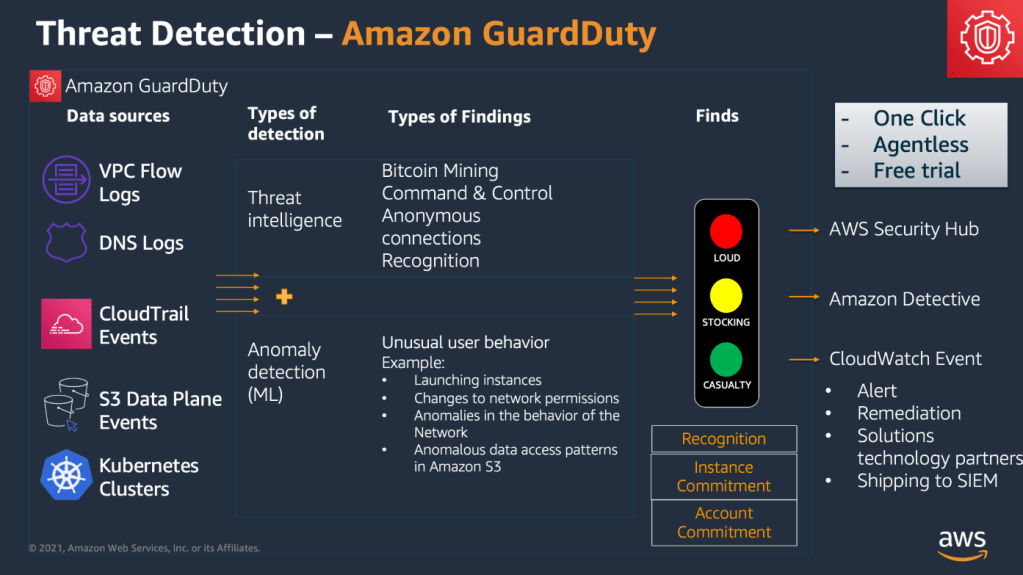
Image sourced from, https://v1.maturitymodel.security.aws.dev/en/2.-foundational/guardduty-all/
“Amazon GuardDuty is a threat detection service that continuously monitors, analyzes, and processes AWS data sources and logs in your AWS environment. GuardDuty uses threat intelligence feeds, such as lists of malicious IP addresses and domains, file hashes, and machine learning (ML) models to identify suspicious and potentially malicious activity in your AWS environment. The following list provides an overview of potential threat scenarios that GuardDuty can help you detect” :
- Compromised and exfiltrated AWS credentials.
- Data exfiltration and destruction that can lead to a ransomware event. Unusual patterns of login events in the supported engine versions of Amazon Aurora and Amazon RDS databases, that indicate anomalous behavior.
- Unauthorized cryptomining activity in your Amazon Elastic Compute Cloud (Amazon EC2) instances and container workloads.
- Presence of malware in your Amazon EC2 instances and container workloads, and newly uploaded files in your Amazon Simple Storage Service (Amazon S3) buckets.
- Operating system-level, networking, and file events that indicate unauthorized behavior on your Amazon Elastic Kubernetes Service (Amazon EKS) clusters, Amazon Elastic Container Service (Amazon ECS) – AWS Fargate tasks, and Amazon EC2 instances and container workloads.
Features of GuardDuty
- Continuously monitors specific data sources and event logs
- Foundational threat detection – When you enable GuardDuty in an AWS account, GuardDuty automatically starts ingesting the foundational data sources associated with that account. These data sources include AWS CloudTrail management events, VPC flow logs (from Amazon EC2 instances), and DNS logs.
- Extended Threat Detection – This capability detects multi-stage attacks that span foundational data sources, multiple types of AWS resources, and time, within an AWS account. However, when these events are observed in a sequence that is indicative of a suspicious activity, GuardDuty identifies it as an attack sequence.
- Use-case focused GuardDuty protection plans – For enhanced threat detection visibility into the security of your AWS environment, GuardDuty offers dedicated protection plans
- S3 Protection – Identifies potential security risks such as data exfiltration and destruction attempts in your Amazon S3 buckets.
- EKS Protection – EKS Audit Log Monitoring analyzes Kubernetes audit logs from your Amazon EKS clusters for potentially suspicious and malicious activities.
- Runtime Monitoring – Monitors and analyzes operating system-level events on your Amazon EKS, Amazon EC2, and Amazon ECS (including AWS Fargate), to detect potential runtime threats.
- Malware Protection for EC2 – Detects potential presence of malware by scanning the Amazon EBS volumes associated with your Amazon EC2 instances. There is an option to use this feature on-demand.
- Malware Protection for S3 – Detects potential presence of malware in the newly uploaded objects within your Amazon S3 buckets.
- RDS Protection – Analyzes and profiles your RDS login activity for potential access threats to the supported Amazon Aurora and Amazon RDS databases.
- Lambda Protection – Monitors Lambda network activity logs, starting with VPC flow logs, to detect threats to your AWS Lambda functions. Examples of these potential threats include cryptomining and communicating with malicious servers.
- Manage multiple-account environment
- Generates security findings for detected threats
- Assessing and managing security findings
- Integrate with related AWS security services
- AWS Security Hub
- Amazon Detective
- Amazon EventBridge
Log Sources
GuardDuty uses the foundational data sources to detect communication with known malicious domains and IP addresses, and identify potentially anomalous behavior and unauthorized activity. While in transit from these sources to GuardDuty, all of the log data is encrypted. GuardDuty extracts various fields from these logs sources for profiling and anomaly detection, and then discards these logs. Foundational data sources are :
GuardDuty Finding Format
When GuardDuty detects suspicious or unexpected behavior in your AWS environment, it generates a finding. A finding is a notification that contains the details about a potential security issue that GuardDuty discovers. GuardDuty uses the following format for naming the various types of findings that it generates :
Each part of this format represents an aspect of a finding type. These aspects have the following explanations:
- ThreatPurpose – describes the primary purpose of a threat, an attack type or a stage of a potential attack. Below is the complete list of GuardDuty threat purposes.
- Backdoor
- Behavior
- CredentialAccess
- Cryptocurrency
- DefenseEvasion
- Discovery
- Execution
- Exfiltration
- Impact
- InitialAccess
- Pentest
- Persistence
- Policy
- PrivilegeEscalation
- Recon
- Stealth
- Trojan
- UnauthorizedAccess
- ResourceTypeAffected – describes which AWS resource type is identified in this finding as the potential target of an adversary. Currently, GuardDuty can generate findings for the resource types that are listed in the GuardDuty active finding types.
- ThreatFamilyName – describes the overall threat or potential malicious activity that GuardDuty is detecting. For example, a value of NetworkPortUnusual indicates that an EC2 instance identified in the GuardDuty finding has no prior history of communications on a particular remote port that also is identified in the finding.
- DetectionMechanism – describes the method in which GuardDuty detected the finding. This can be used to indicate a variation on a common finding type or a finding that GuardDuty used a specific mechanism to detect. For example, Backdoor:EC2/DenialOfService.Tcp indicates denial of service (DoS) was detected over TCP. The UDP variant is Backdoor:EC2/DenialOfService.Udp.A value of .Custom indicates that GuardDuty detected the finding based on your custom threat lists. For more information, see Trusted IP and threat lists.A value of .Reputation indicates that GuardDuty detected the finding using a domain reputation score model. For more information, see How AWS tracks the cloud’s biggest security threats and helps shut them down.
- Artifact – describes a specific resource that is owned by a tool that is used in the malicious activity. For example, DNS in the finding type CryptoCurrency:EC2/BitcoinTool.B!DNS indicates that an Amazon EC2 instance is communicating with a known Bitcoin-related domain.
Sample Log
Before we start looking at the detection rule, let’s first start with the sample log from Splunk. The log comes from AWS CloudTrail and captures DeleteDetector API event.
{
    "eventVersion": "1.08",
    "userIdentity": {
        "type": "IAMUser",
        "principalId": "AIDAYTOGP2RLI4PXTGCEU",
        "arn": "arn:aws:iam::111111111111:user/gowthamaraj_cli",
        "accountId": "111111111111",
        "accessKeyId": "AKIAYTOGP2RLFLKADUVG",
        "userName": "gowthamaraj_cli"
    },
    "eventTime": "2022-07-21T20:27:54Z",
    "eventSource": "guardduty.amazonaws.com",
    "eventName": "DeleteDetector",
    "awsRegion": "us-west-2",
    "sourceIPAddress": "67.171.71.185",
    "userAgent": "aws-cli/2.7.3 Python/3.9.13 Darwin/21.5.0 source/x86_64 prompt/off command/guardduty.delete-detector",
    "errorCode": "BadRequestException",
    "requestParameters": {
        "detectorId": "123"
    },
    "responseElements": {
        "message": "The request is rejected because the parameter detectorId has an invalid value.",
        "__type": "InvalidInputException"
    },
    "requestID": "1e832076-d7a8-432b-b0df-54ba62f6b62c",
    "eventID": "c1367a2f-8910-4e64-9256-a854d2e9f37d",
    "readOnly": false,
    "eventType": "AwsApiCall",
    "managementEvent": true,
    "recipientAccountId": "111111111111",
    "eventCategory": "Management"
}- For example : GuardDuty log file entries, please visit https://docs.aws.amazon.com/guardduty/latest/ug/understanding-guardduty-entries.html
Threat Detection Rule – GuardDuty detector disabled or suspended
Terminologies
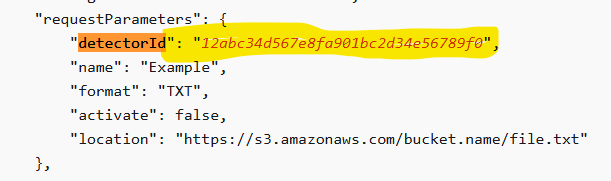
- detector ID
-> Amazon GuardDuty is a regional service.
-> When you enable GuardDuty in a specific AWS Region, your AWS account gets associated with a detector ID.
-> This 32-character alphanumeric ID is unique to your account in that Region. - ListDetectors API
- detectorIds -> A list of detector IDs.
- Lists detectorIds of all the existing Amazon GuardDuty detector resources.
- delete-detector AWS CLI
delete-detector --detector-idaws guardduty delete-detector \--detector-id b6b992d6d2f48e64bc59180bfexample
- DeleteDetector API
- Deletes an Amazon GuardDuty detector that is specified by the detector ID.
- DELETE /detector/detectorId HTTP/1.1
Workflow – Normal
- Administrator with legitimate privilege logs in to AWS Console or use AWS CLI
- Disable or Delete GuardDuty detector. This action is performed :
- Cost saving in non prod account
- Environment decommissioning , etc.
aws guardduty delete-detector --detector-idaws guardduty update-detector --detector-id --enable false
- API call is logged in AWS CloudTrail
"eventSource": "guardduty.amazonaws.com","eventName": "DeleteDetector","awsRegion": "us-west-2"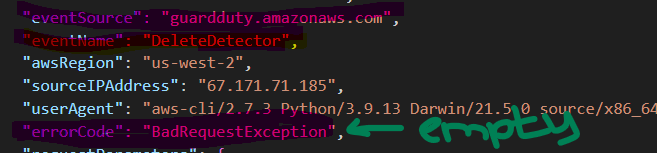
- GuardDuty detector disabled or suspended Detection rule fires.
- Check with the relevant staff to confirm whether this is a legitimate detectorID delete. Tune accordingly for false positive results.
Workflow – Security Testing/ Red Teaming
- Test
- Enable GuardDuty in AWS
- After enabling, suspend detector
- Detele detector
- Bash command
detectorId=$(aws guardduty create-detector --enable --region "#{region}" | grep -oP '(?<="DetectorId": ")[^"]*')aws guardduty update-detector --no-enable --detector-id $detectorIdaws guardduty delete-detector --detector-id $detectorId
- API call is logged in AWS CloudTrail.
"eventSource": "guardduty.amazonaws.com","eventName": "DeleteDetector","awsRegion": "us-west-2"
- GuardDuty detector disabled or suspended Detection rule fires. ( This workflow is derived from, AWS – GuardDuty Suspension or Deletion, https://www.atomicredteam.io/atomic-red-team/atomics/T1562.001#atomic-test-46—aws—guardduty-suspension-or-deletion)
Workflow – Attacker
- Attacker gain access to AWS role or account via compromised IAM user or role with guardduty:DeleteDetector / guardduty:UpdateDetector permission.
- Attacker intentionally delete or disable GuardDuty
aws guardduty delete-detector --detector-idaws guardduty update-detector --detector-id --enable false
- Hence, remove GuardDuty coverage -> enable attacker to procced with lateral movement, data exfiltration, etc.
- API call is logged in AWS CloudTrail..
"eventSource": "guardduty.amazonaws.com","eventName": "DeleteDetector","awsRegion": "us-west-2"- It will be very obvious and noise. This is a post-compromise step.
- GuardDuty detector disabled or suspended Detection rule fires.
- SOC team will investigate
Sigma Rule
If you are new to Sigma rule, you can check out rule template.
title: AWS GuardDuty Detector Deleted Or Updated
id: d2656e78-c069-4571-8220-9e0ab5913f19
status: experimental
description: Detects successful deletion or disabling of an AWS GuardDuty detector, possibly by an attacker trying to avoid detection of its malicious activities or could be part of a legitimate security test. Upon deletion, GuardDuty stops monitoring the environment and all existing findings are lost. Verify with the user identity that this activity is legitimate.
references:
    - https://docs.aws.amazon.com/guardduty/latest/APIReference/API_DeleteDetector.html
    - https://docs.aws.amazon.com/guardduty/latest/APIReference/API_UpdateDetector.html
    - https://docs.aws.amazon.com/guardduty/latest/ug/guardduty_suspend-disable.html
    - https://docs.prismacloud.io/en/enterprise-edition/policy-reference/aws-policies/aws-general-policies/ensure-aws-guardduty-detector-is-enabled
    - https://docs.stellarcyber.ai/5.2.x/Using/ML/Alert-Rule-Based-Potentially_Malicious_AWS_Activity.html
    - https://github.com/Azure/Azure-Sentinel/blob/master/Solutions/Amazon%20Web%20Services/Analytic%20Rules/AWS_GuardDutyDisabled.yaml
    - https://github.com/elastic/detection-rules/blob/main/rules/integrations/aws/defense_evasion_guardduty_detector_deletion.toml
    - https://help.fortinet.com/fsiem/Public_Resource_Access/7_4_0/rules/PH_RULE_AWS_GuardDuty_Detector_Deletion.htm
    - https://research.splunk.com/sources/5d8bd475-c8bc-4447-b27f-efa508728b90/
    - https://suktech24.com/2025/07/17/aws-threat-detection-rule-guardduty-detector-disabled-or-suspended/
    - https://www.atomicredteam.io/atomic-red-team/atomics/T156001#atomic-test-46---aws---guardduty-suspension-or-deletion
author: suktech24
date: 2025-07-20
modified: 2025-07-20
tags:
    - attack.defense-evasion
    - attack.t1562.001
    - attack.t1562.008
logsource:
    product: aws
    service: cloudtrail
    category: management
detection:
    selection_delete:
        eventSource: "guardduty.amazonaws.com"
        eventName: "DeleteDetector"
        errorCode: null
    selection_update:
        eventSource: "guardduty.amazonaws.com"
        eventName: "UpdateDetector"
        errorCode: null
        requestParameters.enable: "false"
    condition: selection_delete or selection_update
fields:
    - eventTime
    - userIdentity.type
    - userIdentity.arn
    - userIdentity.accountId
    - sourceIPAddress
    - awsRegion
    - requestParameters.detectorId
    - userAgent
falsepositives:
    - Legitimate detector deletion by an admin (e.g., during account decommissioning).
    - Temporary disablement for troubleshooting (verify via change management tickets).
    - Automated deployment tools (e.g., Terraform) managing GuardDuty state.
    - Security testing (e.g., Atomic Red Team T1562.001).
level: high

NOTE: Submitted this detection rule to Sigma repo, https://github.com/SigmaHQ/sigma/pull/5536
Investigation , False Positive Analysis , Response and Remediation
The following content is included for completeness and is directly copied from Elastic’s detection rule to GuardDuty detector delete rule. No changes have been made. https://github.com/elastic/detection-rules/blob/main/rules/integrations/aws/defense_evasion_guardduty_detector_deletion.toml.
Possible investigation steps
- Review the CloudTrail logs for the specific event.provider:guardduty.amazonaws.com and event.action:DeleteDetector to identify the user or role responsible for the deletion.
- Check the event.outcome:success to confirm the deletion was successful and not an attempted action.
- Investigate the IAM permissions and recent activity of the user or role identified to determine if the deletion was authorized or potentially malicious.
- Examine any recent GuardDuty findings prior to the deletion to assess if there were any critical alerts that might have prompted the deletion.
- Correlate the timing of the detector deletion with other security events or anomalies in the AWS environment to identify potential patterns or coordinated actions.
- Review AWS CloudTrail logs for any other suspicious activities or changes in the environment around the time of the detector deletion.
False positive analysis
- Routine maintenance or administrative actions may lead to the deletion of a GuardDuty detector. Verify if the deletion aligns with scheduled maintenance or administrative tasks.
- Automated scripts or tools used for environment cleanup might inadvertently delete detectors. Review and adjust automation scripts to prevent unintended deletions.
- Organizational policy changes or restructuring could result in detector deletions. Ensure that policy changes are communicated and understood by all relevant teams to avoid unnecessary deletions.
- Exclude known and authorized users or roles from triggering alerts by creating exceptions for specific IAM roles or user accounts that are responsible for legitimate detector deletions.
- Implement logging and alerting for detector deletions to quickly identify and verify the legitimacy of the action, allowing for rapid response to potential false positives.
Response and remediation
- Immediately re-enable GuardDuty in the affected AWS account to restore monitoring capabilities and ensure continuous threat detection.
- Conduct a thorough review of CloudTrail logs to identify any unauthorized access or suspicious activities that occurred during the period when GuardDuty was disabled.
- Isolate any compromised resources identified during the log review to prevent further unauthorized access or damage.
- Notify the security operations team and relevant stakeholders about the incident for awareness and further investigation.
- Implement additional access controls and monitoring on the AWS account to prevent unauthorized deletion of GuardDuty detectors in the future.
- Review and update IAM policies to ensure that only authorized personnel have permissions to delete GuardDuty detectors.
- Consider enabling AWS Config rules to monitor and alert on changes to GuardDuty configurations for proactive detection of similar incidents.\
Further readings
- Amazon GuardDuty Best Practices, https://aws.github.io/aws-security-services-best-practices/guides/guardduty/
- Data Source: AWS CloudTrail DeleteDetector, https://research.splunk.com/sources/5d8bd475-c8bc-4447-b27f-efa508728b90/
- Detection SIEM use cases, Amazon Web Services, https://www.siemusecases.com/detection-use-cases/cloud/aws
- AWS GuardDuty Detector Deletion, https://docs.stellarcyber.ai/5.2.x/Using/ML/Alert-Rule-Based-Potentially_Malicious_AWS_Activity.htm
- Rules Contributing to Potentially Malicious AWS Activity Alert, AWS GuardDuty Detector Deletion, https://docs.stellarcyber.ai/5.2.x/Using/ML/Alert-Rule-Based-Potentially_Malicious_AWS_Activity.htm
- Investigate most Amazon GuardDuty findings, https://v1.maturitymodel.security.aws.dev/en/2.-foundational/guardduty-all/
 suKTech24
Leave a comment