

Main logging formats for effective threat analysis
In cybersecurity, effective log analysis is crucial for detecting threats and maintaining robust system defenses. For SOC analysts working at SOC centers to analyze the logs, the logs from various devices need to be ingested, parsed (extract relevant information) and stored them. This process allows SOC analysts/detection engineers to find trends, create dashboards for visualizations and go deep into security events analysis. The log formats defines how each log coming through ingestion pipeline should be parsed.
This article focuses on four most commonly used log formats.
- JSON
- CEF (Common Event Format)
- Syslog
- CSV
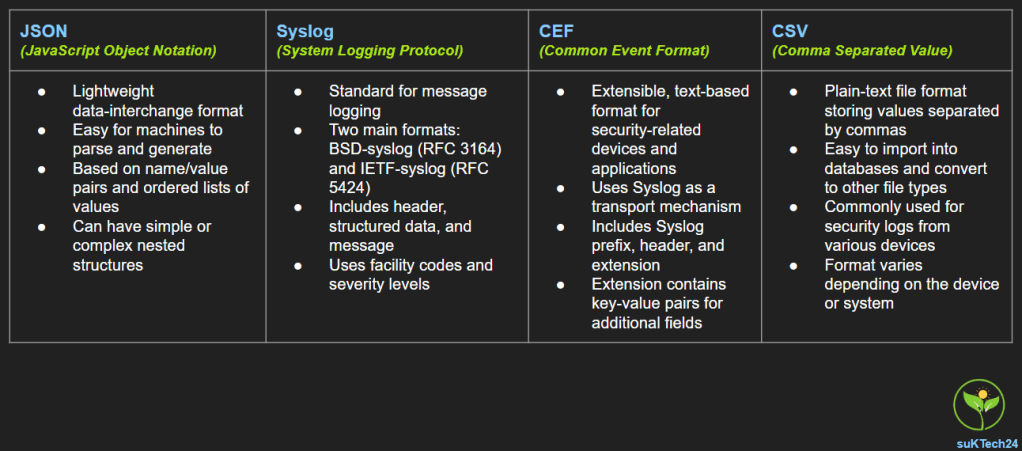
JSON (JavaScript Object Notation)
As per JSON.org, “JSON (JavaScript Object Notation) is a lightweight data-interchange format. It is easy for machines to parse and generate. JSON is built on two structures:
- A collection of name/value pairs
- An ordered list of values
An object is :
- an unordered set of name/value pairs.
- Begins with {left brace and ends with }right brace
- Each name is followed by :colon
- name/value pairs are separated by ,comma.
Below is an example of JSON log – Security Hub Findings – Imported events that are sent from Security Hub to EventBridge
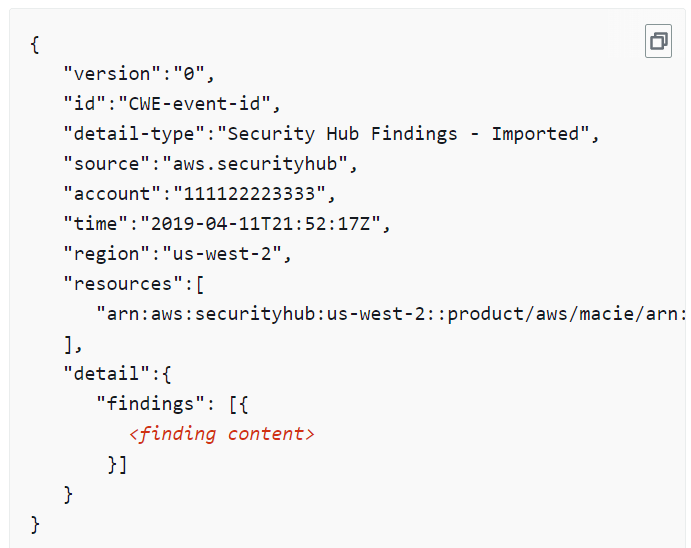
The JSON value types are:
- object
- array
- string
- number
- “true”
- “false”
- “null”
The log size and value types vary depending on the type of devices. Some JSON will be fairly simple and straight forward structure, but others have multiple nested values. Below are the list of examples.
- Microsoft defender log example for complex json log type, https://learn.microsoft.com/en-us/defender-endpoint/api/get-alerts
- key word to search Example 1 – Default Response – This is the type of logs that will be need to be ingested into the log management solutions.
- JSON Tools by Erik Lynd is great for minifying and prettifying in VSCode. Check out the extension.
Syslog( System Logging Protocol)
In computing, syslog is a standard for message logging. It allows separation of:
- Software that generates messages
- System that stores them
- Software that reports and analyzes them.
All syslog messages follow a standard format, which is required for sharing messages between applications. This format includes the following components:
- A header that includes specific fields for priority, version, timestamp, hostname, application, process ID and message ID.
- Structured data, with data blocks in the key-value format.
- A message, to be UTF-8 encoded. Includes a tag identifying the process that triggered the message, along with the content of the message.
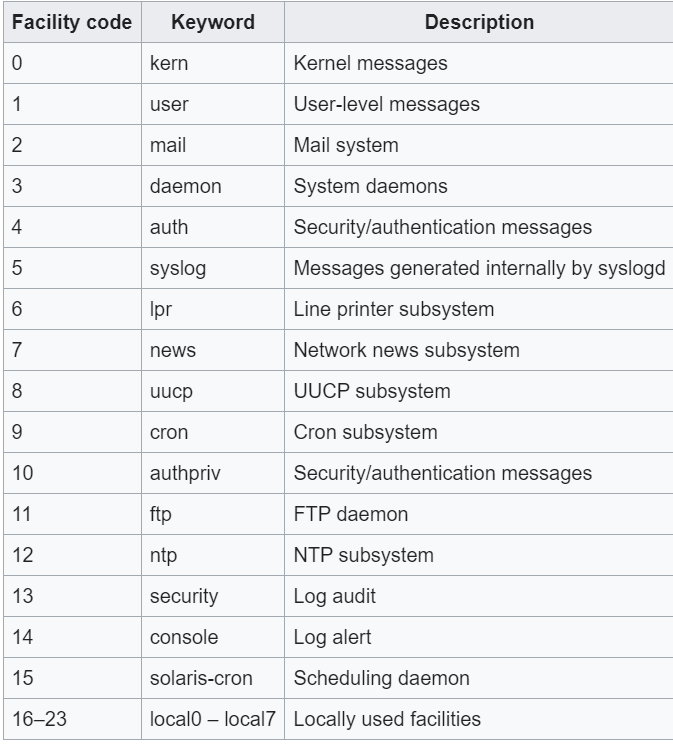
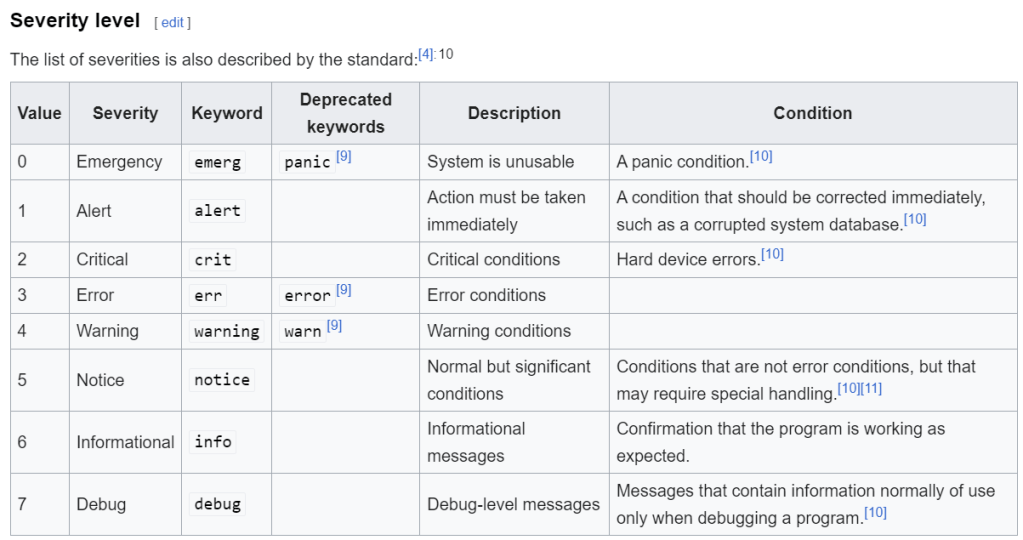
Each message is labeled with a facility code, indicating the type of system generating the message, and is assigned a severity level. There are two syslog format standard:
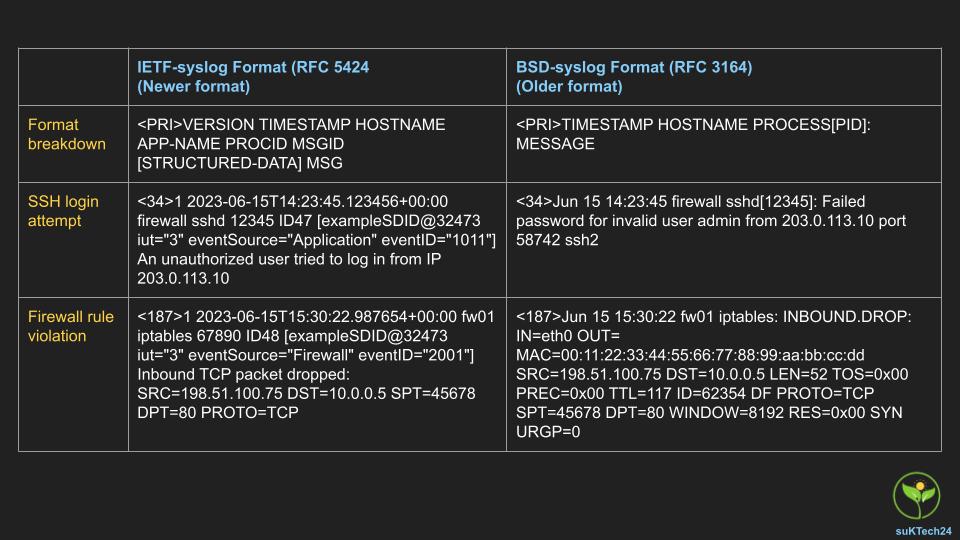
- Older BSD-syslog Format (RFC 3164) – BSD-syslog format is the older syslog format and contains a calculated priority value (known as the PRI), a header, and an event message. PRI is calculated using the facility and severity level.
- The IETF-syslog format is the newer syslog format that uses UTF-8 encoding and includes a header, structured data, and the event message.
- The header is made up of the following parts:
- PRI
- Version
- Timestamp
- Hostname
- Application
- PID
- Message ID
- Syslog Facility code, from wikipaedia, https://en.wikipedia.org/wiki/Syslog
- Severity level, from wikipaedia, https://en.wikipedia.org/wiki/Syslog
Below diagram illustrates the differences between two syslog format types.
CEF (Common Event Format)
As per Implementing ArcSight Common Event Format (CEF) – Version 26, Common Event Format (CEF) is an extensible, text-based format designed to support multiple device types by offering the most relevant information. Common Event Format (CEF) is an open, text-based log format used by security-related devices and applications. Developed by ArcSight Enterprise Security Manager, CEF is used when collecting and aggregating data by SIEM and log management systems.
CEF logs use UTF-8 encoding and include a common prefix, a CEF header, and a variable extension that contains a list of key-value pairs.
CEF uses Syslog as a transport mechanism. It uses the following format that contains a
Syslog prefix, a header, and an extension: Below is the sequence of CEF log is below.
All header field definitions must be present and defined under it.
- CEF: Version – CEF Version
- Device Vendor – deviceVentor
- Device Product – deviceProduct
- Device Version – deviceVersion
- Device Class ID – deviceEventClassId
- Name – name
- Severity – agentSeverity
- Extension – placeholder for additional fields. Any additional fields are logged as key-value pairs.
Jan 18 11:07:53 host CEF:Version|Device Vendor|Device Product|Device
Version|Device Event Class ID|Name|Severity|[Extension]
- Below are two examples of CEF logs from elasticsearch, https://www.elastic.co/docs/current/en/integrations/cef
- 1.1 – CEF without syslog

- 1.2 – CEF without syslog

2. Below is an example of CEF log – Microsoft Windows Security Event Log sample message when you use Syslog to collect logs in CEF format
- CEF:0|Microsoft|Microsoft Windows||Service Control Manager:7036|Service entered the stopped state|Low| eventId=132 externalId=7036 categorySignificance=/Normal categoryBehavior=/Execute/Response categoryDeviceGroup=/Operating System catdt=Operating System categoryOutcome=/Success categoryObject=/Host/Application/Service art=1358378879917 cat=System deviceSeverity=Information act=stopped rt=1358379018000 destinationServiceName=Portable Device Enumerator Service cs2=0 cs3=Service Control Manager cs2Label=EventlogCategory cs3Label=EventSource cs4Label=Reason or Error Code ahost=192.168.0.31 agt=192.168.0.31 agentZoneURI=/All Zones/example System/Private Address Space Zones/RFC1918: 192.168.0.0-192.168.255.255 av=5.2.5.6395.0 atz=Country/City_Name aid=00000000000000000000000\\=\\= at=windowsfg dvchost=host.domain.test dtz=Country/City_Name _cefVer=0.1 ad.Key[0]=Portable Device Enumerator Service ad.Key[1]=stopped ad.User= ad.ComputerName=host.domain.test ad.DetectTime=2013-1-16 15:30:18 ad.EventS
For parsing cef log, it is not as straight forward as JSON. Refer to this official documentation for more details, https://www.microfocus.com/documentation/arcsight/arcsight-smartconnectors-8.4/pdfdoc/cef-implementation-standard/cef-implementation-standard.pdf
CSV (Comma Separated Value)
CSV is a file format that stores values in a comma-separated format. It is a plain-text file format, which allows CSV files to be easily imported into a storage database, regardless of the software used. Because CSV files are not hierarchical or object-oriented, they are also easier to convert to other file types.
They allow for seamless transfer of data between disparate sources, making it easier to analyze and process information. Security logs generated by systems, Firewalls, intrusion detection systems (IDS), and other security devices often come in CSV format.
The log format depends on each device. For example, for cisco firewall log, below is the format. Refer to documentation for more details, https://docs.sse.cisco.com/sse-user-guide/docs/cloud-firewall-log-formats
- Log Format
`timestamp,origin IDs,identities,identity type,direction,protocol,packet size,source IP,source port,destination IP,destination port,data center,rule ID,action,fqdns,destination list IDs,first packet timestamp,last packet timestamp,packets sent,packets received,bytes sent,bytes received,fw event ID`
- Log Sample
- “2024-06-14 18:59:57″,”[211039844]”,”Passive Monitor”, “CDFW Tunnel Device”,”OUTBOUND”,”1″,”84″,”172.17.3.4″,””,”146.112.255.129″, “”,”ams1.edc”,”12″,”ALLOW”,”google.com,apple.com”,”44,66″,”1718391597″,”1718391597″,”3″,”3″,”1108″,”755″,”39-42″
Refer to CSV explained to learn more, https://isecjobs.com/insights/csv-explained/
Summary
As you have seen commonly used logs, I hope that they highlights the importance of understanding different log formats.
References
- Cybersecurity 101: 6 Common Log File Formats, Arfan Sharif by Crowdstrike, https://www.crowdstrike.com/cybersecurity-101/observability/log-file-formats/
- ArcSight SmartConnectors, https://www.microfocus.com/documentation/arcsight/arcsight-smartconnectors-8.4/pdfdoc/cef-implementation-standard/cef-implementation-standard.pdf
- Introducing JSON, https://www.json.org/json-en.html
- Syslog Logging Guide: The Basics, https://www.crowdstrike.com/guides/syslog-logging/
- Syslog, https://www.paessler.com/it-explained/syslog
- What is JSON: Understanding Syntax, Storing JSON Data, Examples + Downloadable Cheat Sheet, https://www.hostinger.co.uk/tutorials/what-is-json#
- What is Syslog?, https://www.solarwinds.com/resources/it-glossary/syslog
- What is syslog by sumo logic, https://www.sumologic.com/syslog/
Blog categories


 suKTech24
Leave a reply to Mohamed Cancel reply